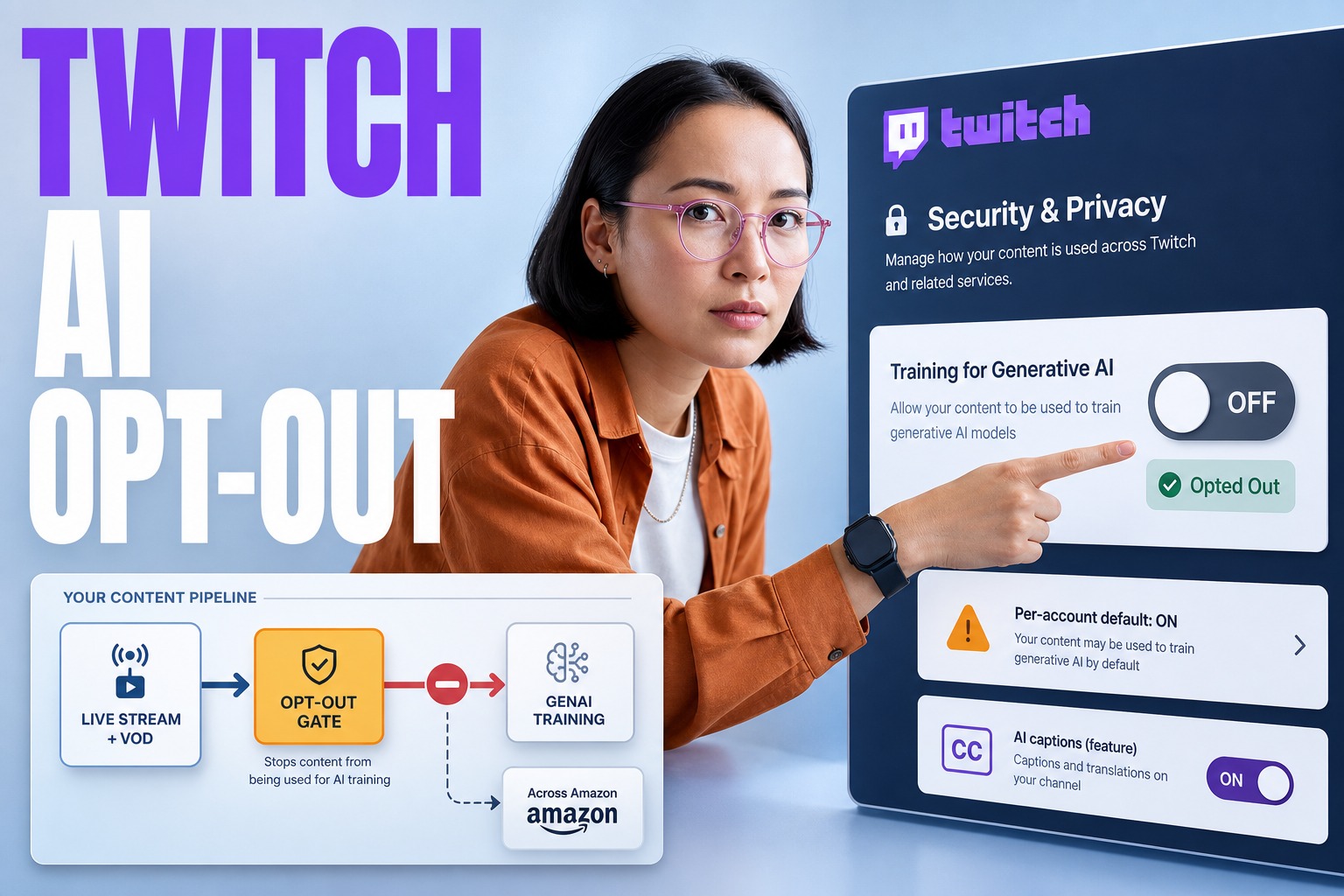
Is Twitch using streams to train generative AI models now? → Twitch’s settings FAQ states that when training is allowed, streamer content may be used to improve generative AI content models used across Amazon.
Is it opt-in or opt-out? → Streamers are opted in by default and must manually toggle off training in the Security and Privacy settings.
What is the business-grade risk here? → Default opt-in turns public streaming into a third-party AI training data flow, shifting IP and privacy exposure outside your engineering controls.
What’s the primary question this article answers? → How do we opt out of Twitch generative AI training, and what governance/architecture changes do we need this quarter to protect IP and regulated data?
What’s the practical angle? → We treat Twitch like a data processor with an AI training path and design operational evidence, contracts, and streaming architecture accordingly.
Quick answer: how to opt out of Twitch generative AI training (and what it really means)
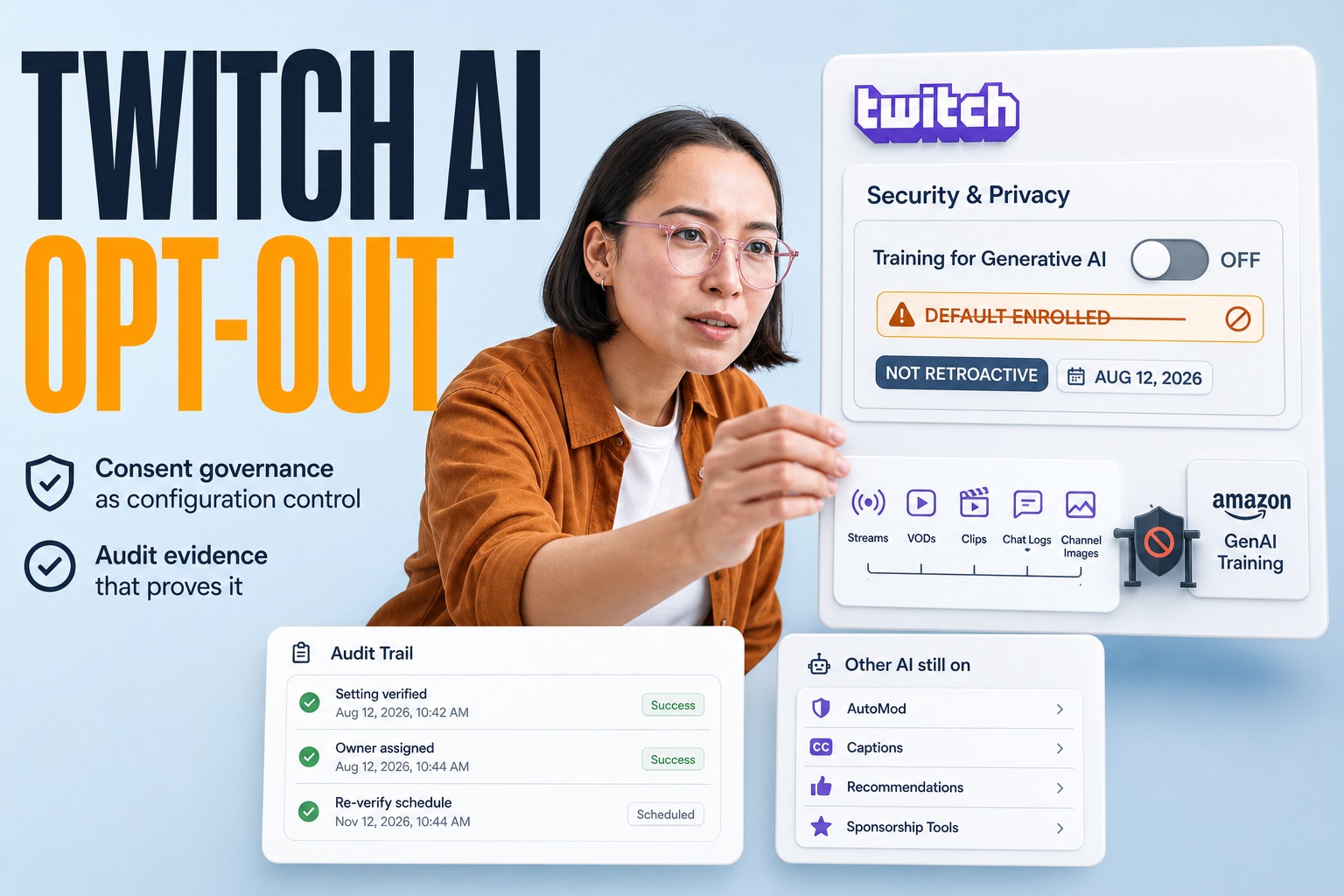
Twitch provides a setting that lets streamers opt out. In Twitch settings, go to the Security and Privacy tab and locate the Training for Generative AI toggle; turning it off opts the account out of that generative AI training program.
The engineering reality is that opt-out reduces one specific risk path (your stream content being used to improve future generative AI models), but Twitch also states that opting out does not opt you out of all AI or machine learning uses on the platform. Teams should respond by treating Twitch as an external data processor, documenting what content can be streamed, and requiring opt-out as a baseline control for employees and partners.
The dominant shift: default opt-in makes streaming a data pipeline decision, not a marketing decision
When a platform defaults creators into AI training, the technical decision moves from individual streamers into governance and compliance. At Plavno, we see the same pattern in enterprise SaaS: defaults define your exposure, not the fine print. Twitch’s own FAQ frames training as using audio to refine capabilities like speech-to-text, improving captions at Twitch and also across Amazon. That matters because it explicitly ties your stream artifacts to model improvement beyond a single product boundary.
Reasonable engineers can disagree on whether this is acceptable for public content, but the claim we argue is narrow and operational: the risk you’ll feel first is not model quality, it’s loss of control at the processor boundary. If your studio streams unreleased gameplay, if your brand runs support sessions with customer details, or if your esports org streams internal comms by mistake, the default setting turns ‘oops’ moments into durable training inputs unless you treat the platform configuration as production infrastructure.
The part many teams miss: model training is different from AI-supported features
Twitch’s FAQ distinguishes generative AI training from other AI-supported features such as auto-generated captions. The distinction matters operationally: training implies content may be used for future model improvements, while AI-supported features can still process your streams, VODs, and related data for on-platform functionality without that retained model-improvement path.
For engineering leaders, this means you need two policies, not one. One policy governs whether your content can be used to improve generative models, and another governs whether any AI processing is acceptable at all in your streaming footprint. When teams collapse these, they either overreact and ban tooling they depend on (like captions), or underreact and assume a single toggle eliminates all AI-related exposure.
Central claim: the failure mode is governance at the opt-out boundary, not ‘AI’ itself
Our central claim is this: Twitch’s default opt-in training breaks the common engineering practice of assuming third-party platforms are passive distribution, and the right response is to treat Twitch as an active data processor with explicit AI training controls, evidence, and contractual requirements.
Why is this arguable? Because some teams will argue that streams are public anyway, so training is irrelevant. In practice, ‘public’ is not the same as ‘licensed for model improvement across a corporate ecosystem,’ and your risk posture changes because you lose observability and recourse. The backlash that surfaced as a large Twitch User Voice thread (228 pages with nearly 14,000 votes in favor of AI being optional and opt-out by default) signals the market reality: many creators and studios do not consent to this by default, and your organization becomes the one cleaning up the operational consequences.
| What changes with default opt-in | Where it hits engineering teams first | The response that holds up in audits and disputes |
|---|---|---|
| Stream/VOD/audio may be used to improve generative AI content models across Amazon when training is allowed | You cannot prove downstream use or scope from your own logs | Treat Twitch as a processor: enforce configuration baselines and retain evidence of settings |
| Opt-out is a per-account setting surfaced in Security and Privacy | Employees/partners may not know it exists; defaults persist | Operationalize opt-out in onboarding and partner playbooks |
| Opt-out does not remove all AI/ML processing (e.g., captions can still be AI-supported) | Teams assume ‘toggle off’ equals ‘no AI’ and stream sensitive data | Separate ‘training allowed’ from ‘AI processing allowed’ in policy |
Map the data flow like an architect: what content exists, where it travels, and who can toggle it
If you want an answer that survives a board meeting, treat Twitch like any other external system that processes your data. Start by mapping what you stream: game footage, developer commentary, customer calls, internal guests, or third-party assets. Twitch’s own language explicitly includes streams and VODs in the AI/ML scope for features, and training permission extends to content being used for future generative model improvements.
From an architecture perspective, your ‘streaming stack’ is not just OBS and a Twitch channel. It includes identity and access management for Twitch accounts, token and session hygiene, and the operational path by which VODs are published, clipped, and re-shared. Even if you use Twitch APIs in your tooling (commonly via Twitch Helix endpoints or EventSub for automation), your company still needs one authority for settings baselines. Otherwise the weakest-link account remains opted in, and you cannot later reconstruct which streams were eligible for training.
Decide what your organization considers streamable content → If it contains unreleased IP, third-party assets, or regulated customer data, treat it as restricted regardless of platform terms.
Assign an owner for Twitch account configuration → Without a named owner, opt-out becomes a hope, not a control.
Require opt-out as a baseline → Default opt-in means ‘do nothing’ is a decision you did not intend to make.
Separate training permission from AI feature usage → Twitch indicates opt-out does not remove all AI/ML uses, so your policy must reflect both layers.
Retain evidence of settings → Screenshots and change logs sound primitive, but they are often the only defensible artifacts when platforms don’t expose configuration audit APIs.
Operationalize opt-out: make it measurable, repeatable, and reviewable
The biggest practical problem called out in the market reaction is discoverability: a toggle can be simple and still fail if creators and staff never see it. In engineering terms, this is configuration drift. Your goal is to eliminate drift by making Twitch settings part of a repeatable operational process, the same way you treat MFA enforcement or repository protection rules.
At Plavno, when clients ask how to turn ‘policy’ into ‘practice,’ we anchor it in evidence and review cadence. The opt-out step lives in Security and Privacy, and that’s a clue: it should be owned by the same function that owns security posture for external tools. If your organization is already running periodic access reviews, fold Twitch into that list. If you are not, it’s a good moment to start, because default opt-in training is exactly the kind of change that turns informal processes into liability. This is also where a focused cybersecurity and penetration testing engagement can help you inventory external data processors and harden the weakest accounts.
- Bold baseline configuration record: Capture which accounts exist, who owns them, and whether Training for Generative AI is off.
- Bold onboarding proof: Require new channel owners (employees or contractors) to provide evidence of opt-out before first stream.
- Bold periodic review artifact: Store a dated record of settings checks on a schedule you can defend internally.
- Bold incident note template: If something sensitive is streamed, document whether the account was opted out at the time.
- Bold partner compliance acknowledgment: For co-streams or influencer streams tied to your IP, require written confirmation of their setting.
For game studios, the uncomfortable question is IP: whose content is being ‘allowed’ for training?
The analyst concern raised publicly is the one studio leaders should take seriously: if a creator streams your game while opted in, does the platform treat that as permission to use your game content as training input? Twitch’s setting is controlled by the streamer account, not by the underlying rights holder whose work appears on-screen. That mismatch is the architecture bug.
Studios often assume their control point is distribution: keys, builds, embargo dates, and influencer contracts. Default opt-in training introduces a new control point: the platform’s AI training permission, which the studio cannot set directly unless it controls the account. That means your influencer and partner agreements may need to evolve from ‘don’t leak before date X’ into ‘do not stream our content unless AI training is disabled.’ You may also need internal policy for your own staff streams: dev streams, community managers, and QA showcases can all inadvertently expose unreleased material that now sits inside a training-allowed boundary.
Brands and enterprises on Twitch: privacy risk is usually accidental, not malicious
For non-gaming businesses, the risk profile often looks different. You might stream product launches, live webinars, or customer support segments. The content is ‘public,’ but the operational reality is messy: names appear in chat overlays, dashboards are briefly visible, and employees improvise. When training is allowed by default, the cost of those moments increases because you’ve consented to a downstream improvement loop you cannot observe.
Twitch’s FAQ also notes that opting out of generative AI training does not opt you out of all AI/ML uses, including AI-supported features like auto-generated captions. That matters for enterprises that rely on captions for accessibility or moderation workflows. You can keep the feature benefit while still declining generative training, but only if your teams understand the difference and your policy documents it. In practice, this becomes a decision about whether Twitch is a safe surface for anything that could trigger compliance obligations, and that decision should be explicit.
If you cannot audit it, you should assume you cannot later prove it didn’t happen.
Platform vs pipeline: if Twitch is your distribution, consider owning the capture layer
Many teams jump from ‘Twitch changed a setting’ straight to ‘we should leave Twitch.’ That’s not always realistic. A more engineering-grounded response is to separate the capture layer from the distribution layer. If you control what gets captured, stored, and published, you can reduce exposure even when distribution happens on a platform with shifting defaults.
In practice, owning the capture layer means you standardize what is allowed on-screen, what overlays are permitted, and what content sources can be mixed into the stream. It also means controlling VOD retention and clip creation on your side where possible, so the only artifacts that exist are the ones you intended to publish. Organizations sometimes automate this with internal tooling and workflow gates; if you already use Twitch integrations (for example, automations triggered by live events), make sure those automations don’t accidentally publish sensitive scenes. This is also where AI-driven operational tooling can be useful: not for generating content, but for reducing human error through checks and workflows, which aligns with AI automation when it’s implemented as governance, not hype.
| Streaming approach | What you control | What you still can’t control |
|---|---|---|
| Twitch-first (minimal internal pipeline) | Almost none beyond what operators remember to do | Default settings, downstream training scope, discoverability of toggles |
| Self-owned capture + Twitch distribution | Capture sources, retention on your side, operational gates | Twitch’s platform-level processing and account-level configuration |
| Hybrid with strict account ownership | Identity, roles, and standard settings across accounts | Third-party partner accounts and co-stream behaviors |
Contracts and partner ops: default opt-in changes what ‘permission’ should mean
The sharpest edge case is partner-created content. You may sponsor creators, share unreleased assets, or run co-marketing streams. Historically you managed that with brand guidelines and embargoes. Now you need a control about AI training settings, because the platform’s consent mechanism sits with the streamer.
This is not about turning every creator into a compliance officer. It’s about making one binary requirement easy to understand and verify: if you are streaming our IP under agreement, training must be disabled. If you can’t verify it, you should treat the stream as higher risk and avoid showing anything you wouldn’t want used for model improvement. Because Twitch revealed the setting indirectly via a support communication and not a high-visibility announcement, you should assume many partners won’t know the toggle exists unless you tell them. This is why we push clients to document partner runbooks and require a pre-stream configuration check in the same way you require a technical rehearsal.
How to evaluate this quarter: stay, pause, or redesign based on control, not outrage
If your team is making a decision this quarter, we recommend framing it like any other production platform dependency. You’re not deciding whether generative AI exists; you’re deciding whether a platform’s default training permission is compatible with your IP and privacy posture. Twitch leadership reportedly acknowledged that an opt-in approach would result in very low participation; that’s a signal that the platform expects most creators would choose not to participate if asked explicitly. As engineers, we should treat that as a reason to increase our own controls, not as a reason to hope for platform reversal.
A ‘stay’ decision is reasonable when your streamed content is already intended for wide reuse and you can enforce opt-out across all accounts you control. A ‘pause’ decision is reasonable when you have partner-driven exposure you cannot verify, or when you stream unreleased content as part of your go-to-market plan. A ‘redesign’ decision is reasonable when streaming is core to your product or community strategy and you need stronger guarantees than a platform toggle can provide. If you choose redesign, the cost is not just infrastructure; it’s ownership of identity, workflow, and evidence.
- Bold Stay: You control all channel identities, can enforce opt-out, and streams don’t include unreleased or sensitive material.
- Bold Pause: You depend on third-party creators for launches, cannot verify their settings, and leakage would materially harm your business.
- Bold Redesign: Streaming is a product surface and you need stronger governance, retention control, and review gates than the platform offers.
- Bold Split strategy: Keep Twitch for public-facing content, move sensitive demos to controlled environments with tighter access.
The hard limitation: opting out of training is not opting out of AI processing
Twitch’s FAQ explicitly notes that opting out of generative AI training does not opt you out of all AI or machine learning uses on Twitch. That matters because teams often implement a single control and then relax. If your policy says ‘we opted out, we’re safe,’ you’ll eventually stream something that assumes no AI processing exists, even though AI-supported features can still operate.
From a systems perspective, you should treat ‘training allowed’ as one dimension and ‘AI processing allowed’ as another. Training relates to future model improvement; processing relates to current feature functionality. For some organizations, AI-supported features like captions are desirable and low-risk; for others, any automated processing of audio or text is sensitive. The point is not that one answer is correct, but that you need a decision that is documented, reviewable, and consistent across accounts. Otherwise your response is brittle and depends on individual streamer behavior.
| Control you can set today | What Twitch indicates can still happen | Mitigation that doesn’t rely on wishful thinking |
|---|---|---|
| Turn off Training for Generative AI | AI-supported features can still use streams/VODs (e.g., auto-generated captions) | Define what can be spoken/shown, and gate sensitive sessions off Twitch |
| Limit who can stream from official accounts | Partner accounts may still be opted in by default | Add partner requirements and pre-stream verification |
| Restrict VOD publication behavior | Live mistakes still happen | Rehearsal, overlays discipline, and capture-layer controls |
Plavno’s perspective: the winning move is governance that engineers can actually run
At Plavno, we’re not interested in culture-war arguments about AI. We’re interested in whether your team can ship safely. Default opt-in training is a governance problem that looks like an engineering problem: configuration drift, missing evidence, unclear ownership, and unmodeled third-party processing. The fix is the same kind of fix you’d apply to any production dependency: define the control, implement the workflow, and make it auditable.
If you’re building AI-enabled products yourself, you already know that training data scope and consent are where projects get stuck, not at model selection. That’s why we approach this with the same rigor we apply to enterprise AI systems: data flow mapping, policy-as-process, and operational artifacts. When teams want a structured approach that connects legal posture to system design, this is exactly the kind of work we do in AI consulting.
If your business depends on creators, your real system is the creator workflow—not the model, not the platform.
Real-world patterns that work: layered controls without killing growth
Studios and brands rarely have the luxury of shutting down streaming. What does work is layering controls so that one mistake doesn’t become systemic exposure. The first layer is identity: official channels should be owned by company-controlled accounts with a documented baseline. The second layer is workflow: before high-stakes streams (launches, unreleased reveals, customer sessions), treat the stream like a release event with a rehearsal and a configuration check. The third layer is content discipline: overlays, scene switching, and guest access should be standardized so you don’t accidentally display dashboards, internal chats, or build metadata.
The fourth layer is partner operations. If you distribute early access or run influencer campaigns, you need a partner checklist that includes AI training settings and a clear definition of what is allowed on-stream. This is where organizations often benefit from a dedicated engineering partner to implement workflow tooling, account governance, and review processes quickly without derailing product teams. Depending on your staffing strategy, that can look like outstaffing for embedded specialists or a smaller delivery pod.
Lock down official accounts first → Make opt-out non-negotiable on company-controlled channels and document it.
Treat high-stakes streams like releases → Rehearse, verify settings, and control what scenes can be shown.
Make partner streaming conditional → If a partner can’t confirm the training toggle is off, don’t stream unreleased assets.
Separate public content from sensitive content → If something would be damaging as training input, it shouldn’t be on Twitch.
Review after incidents, not just after backlash → The risk doesn’t end when the news cycle ends.
Closing insight: default opt-in means your risk posture changed overnight—act like it
The most actionable fact is simple: Twitch’s settings indicate your content may be used for future generative AI model improvements across Amazon when training is allowed, and streamers are opted in by default unless they turn it off. The rest is operational consequence. If you do nothing, you have still made a decision: you accepted that training permission as your default.
This quarter, the right posture is to treat Twitch settings like production configuration, not a personal preference. Own the accounts, require opt-out where appropriate, document evidence, and redesign workflows when you cannot verify partner settings. That approach is boring, but it’s the kind of boring that prevents preventable disputes about IP and privacy.
Author: Plavno team
Last updated: August 2026
Contextual next step for teams with real IP and compliance exposure
If you have unreleased IP, partner-driven launches, or any possibility of regulated data appearing on streams, we can help you turn a vague ‘we should opt out’ into an enforceable operating model: account ownership, evidence retention, partner requirements, and workflow gates. This is the same discipline we apply when building and hardening production-grade AI and automation systems, and it integrates cleanly with your broader engineering roadmap at Plavno.
The goal is not to stop streaming; it’s to keep streaming while staying in control of what your business is consenting to. If you want to implement supporting automation and controls, you can also use AI agents development to operationalize checks, partner verification workflows, and evidence capture without adding manual overhead.
 Chat GPT
 Perplexity
 Claude
 Gemini