bg image
bg image

Serving Chesapeake & Virginia

Stop Losing Chesapeake Sales Leads to Manual CRM Work in 2026

Chesapeake sales and marketing teams lose hours every week to manual CRM tasks that software should handle. Leads go cold while reps sort and prioritize by hand. Follow-ups get missed because no system tracks them automatically. Marketing sends generic campaigns with no targeting intelligence behind them. Existing customers churn because nobody noticed the early warning signs. If your team spends more time updating records than closing deals, the problem is your tooling, not your people. Get AI CRM Automation cost estimate in 24 hours.

Discuss Project

Overview

Chesapeake businesses lose revenue when CRM data sits idle

Chesapeake companies in logistics, real estate, and auto retail still run their customer relationships on disconnected spreadsheets and manual data entry. Sales teams spend hours sorting leads, routing follow-ups, and updating contact records by hand. Marketing teams blast generic campaigns with no targeting intelligence behind them. AI CRM automation changes this by connecting your customer data to models that score, route, and act on it in real time. We build these systems for businesses across Hampton Roads who need their CRM to work harder than a glorified address book.

Trusted AI CRM Automation Partner for Chesapeake Businesses. We work with US-based clients, including companies operating in Virginia. Over the past several years we have delivered 10-plus AI CRM automation projects in the US market, including implementations for freight and logistics teams in the Norfolk metro area. Our work covers Salesforce AI integration and HubSpot AI automation for companies that have outgrown basic CRM setups.

When you customize your CRM with automation, the goal is not more software. The goal is fewer manual touches between a lead arriving and a rep responding. We focus on reducing that gap with AI lead scoring, workflow triggers, and retention automation that runs without daily oversight. Companies in Chesapeake, Virginia Beach, Portsmouth, and Suffolk see the biggest gains when their CRM stops being a data graveyard and starts driving revenue.

The work starts with your existing data. We map every field, pipeline stage, and touchpoint. Then we deploy models that prioritize leads by conversion probability, trigger follow-up sequences, and flag churn risks. For a freight quoting client, we built an AI agent that handled quote automation and tracking workflow orchestration. For a property platform, we built a personalized house-hunting system that matched users to listings automatically.

The result is a system that does the repetitive work while your team focuses on conversations. No more guessing which lead matters. No more manual list imports. No more 48-hour response windows on hot opportunities. Your CRM finally earns the license fee you pay for it.

Talk to an Expert
AI Lead Scoring

AI Lead Scoring

Real-time ranking by conversion probability using historical deal data and behavioral signals

Sales Automation Workflows

Sales Automation

Event-driven workflow triggers on deal stage transitions with full compliance logging

Marketing Automation with AI

Marketing with AI

LLM-powered audience segmentation and content generation adapted by engagement signals

Customer Retention Automation

Retention Automation

Anomaly detection flags churn risks and triggers proactive save workflows automatically

plavno logo

Build your first
Smart AI project today!

Just tell the Plavno AI Agent about your project - it will ask questions, gather requirements, and propose a tailored solution

Core Architecture for AI-Driven CRM

The build: data pipelines, LLM reasoning, and CRM sync

The core of every CRM automation project is a data pipeline that moves information between your CRM, your communication tools, and the AI models that make decisions. We build ingestion layers that pull from Salesforce or HubSpot APIs, normalize the data, and feed it into scoring and routing models. The pipeline runs on event-driven architecture so triggers fire in real time rather than nightly batches. For Chesapeake teams where a delayed follow-up means a lost deal, this matters.

We use Python for the orchestration layer because its ecosystem for data processing and ML model serving is the most mature in production environments. For CRM integration, we rely on official Salesforce and HubSpot APIs rather than screen scraping or brittle third-party connectors. This keeps your automation alive when vendors update their platforms. The models themselves run on OpenAI or open-source alternatives depending on data sensitivity and cost targets. Every model call is logged for audit and rollback purposes.

Security and compliance are built into the pipeline from day one, not bolted on after launch. Customer data never leaves your tenant without encryption at rest and in transit. We deploy within your existing cloud environment, whether that is AWS, Azure, or a private datacenter. Access controls follow least-privilege principles with role-based permissions. For Virginia companies in regulated industries, we map every data flow against HIPAA or SOC 2 requirements before a single line of code ships.

DevOps is not an afterthought in our approach. We set up CI/CD pipelines that run automated tests against your CRM sandbox before promoting changes to production. This catches schema mismatches and API contract violations before they reach your live environment. Monitoring covers API rate limits, model latency, and error rates around the clock. When a workflow fails, the system alerts your team rather than failing silently into a log file nobody reads.

For the freight quoting project, this architecture handled quote requests end to end. The AI agent read inbound emails, extracted shipment details, queried rate tables, and returned quotes automatically. The same pipeline routed tracking updates to customers without human intervention. That is what production CRM automation looks like when it is built correctly and maintained properly.

What We Deliver

Five capabilities for Chesapeake CRM teams in 2026

AI Lead Scoring

AI Lead Scoring

Chesapeake sales teams waste hours ranking leads by gut feel and recency. We build scoring models that rank every lead by conversion probability using historical deal data, firmographics, and behavioral signals. The model runs on Python with scikit-learn for tabular features and OpenAI embeddings for unstructured text inputs. Scores update in real time as leads interact with your site or respond to emails. Reps see a ranked queue instead of a raw list. Your team spends time on the deals most likely to close.

Sales Automation Workflows

Sales Automation Workflows

Manual follow-up sequences break down when reps get busy or pipeline volume spikes unexpectedly. We build Salesforce AI integration workflows that trigger calls, emails, and tasks based on deal stage transitions. Each workflow runs on event-driven triggers defined in your CRM rules engine. For the freight quoting client, we built an AI agent that handled quote automation end to end, replacing manual email triage entirely. The system logs every action for compliance review. Reps no longer manage reminders because the system manages them.

Marketing Automation with AI

Marketing Automation with AI

Generic email blasts produce low engagement and high unsubscribe rates across every industry. We build HubSpot AI automation workflows that segment audiences by predicted lifecycle stage and content preference. The system generates subject lines and body content using LLMs trained on your brand voice and past performance. We chose HubSpot because its API supports multi-step workflow branches with conditional logic natively. Campaigns adapt based on open rates and click behavior without manual A/B intervention. Your marketing team ships campaigns that target individuals, not mail merge lists.

Customer Retention Automation

Customer Retention Automation

Most companies find out a customer is churning when the renewal call goes unanswered. We build retention automation that monitors usage patterns, support ticket frequency, and engagement signals continuously. When a customer crosses a risk threshold, the system triggers a save workflow with personalized outreach content. We use anomaly detection models built in Python to catch early warning signs that humans miss. For Chesapeake auto dealerships, this means flagging service customers who have not booked a maintenance appointment in six months. Retention becomes proactive rather than reactive guesswork.

Chatbot to CRM Integration

Chatbot to CRM Integration

Live chat tools capture conversations but rarely sync back to CRM records without manual effort. We build chatbot to CRM integration that routes every conversation into the right contact, deal, or ticket automatically. For the house-hunting platform, we connected a conversational interface to a property database that matched users to listings automatically based on their criteria. The chatbot collected search parameters, the system stored them as CRM fields, and follow-up emails referenced the exact properties discussed. We use REST APIs and webhook listeners to keep both systems in sync. No conversation is lost or orphaned in a separate silo.

Project Delivery

From discovery to launch in four phases

Every AI CRM automation project follows the same delivery structure regardless of platform choice or industry vertical.

Clipboard
Team
01

Step 1: Discovery & Data Audit (1-2 weeks)

We start by auditing your existing CRM data, pipeline stages, and integration points in detail. The team maps every data source, identifies gaps, and documents the manual workflows that slow your team down. You receive a data quality report, a workflow inventory, and a technical specification document. This phase sets the scope and prevents scope drift later in the project. For Chesapeake teams, we also evaluate whether your current CRM plan supports the API limits your automation will need. Discovery ends with a signed technical spec and a firm delivery timeline.

02

Step 2: Model Development & Sandbox Build (3-4 weeks)

We build the scoring, routing, and retention models in a sandbox environment connected to a copy of your CRM data. The models run against historical data to validate accuracy before touching live operations. You receive weekly performance reports showing precision, recall, and false positive rates for every model. We use this period to train your team on what the automation will and will not do in production. Nothing deploys to production until you sign off on the metrics and accept the model behavior.

Search in doc
Rocket
03

Step 3: Production Deployment & Integration (2-3 weeks)

We promote the sandbox build to your production CRM environment with full CI/CD pipelines and rollback procedures configured. Integration points with email, chat, and marketing tools are tested end to end before go-live. We configure alerts for API rate limits, model latency, and workflow failures at this stage. You receive runbooks for every automated process and a live monitoring dashboard. The system goes live in a controlled rollout with a subset of users before full enablement across the team.

04

Step 4: Post-Launch Tuning & Handoff (ongoing)

The first 30 days after launch are about tuning, not walking away from the project. We monitor model drift, workflow error rates, and user adoption metrics during this critical window. Thresholds for lead scoring and churn flags get adjusted based on real production behavior patterns. You receive a monthly performance report comparing automation throughput to manual baselines measured during discovery. After 90 days, we hand off full operational control with documentation and training sessions. Support remains available but the system runs on your infrastructure under your control.

Testimonials

We are trusted by our customers

“They really understand what we need. They’re very professional.”

The 3D configurator has received positive feedback from customers. Moreover, it has generated 30% more business and increased leads significantly, giving the client confidence for the future. Overall, Plavno has led the project seamlessly. Customers can expect a responsible, well-organized partner.

Sergio Artimenia

Commercial Director, RNDpoint

Sergio Artimenia

“We appreciated the impactful contributions of Plavno.”

Plavno's efforts in addressing challenges and implementing effective solutions have played a crucial role in the success of T-Rize. The outcomes achieved have exceeded expectations, revolutionizing the investment sector and ensuring universal access to financial opportunities

Thien Duy Tran

Product Manager, T-Rize Group

Thien Duy Tran

“We are very satisfied with their excellent work”

Through the partnership with Plavno, we built a system used by more than 40 million connected channels. Throughout the engagement, the team was communicative and quick in responding to our concerns. Overall, we were highly satisfied with the results of collaboration.

Michael Bychenok

CEO, MediaCube

Michael Bychenok

“They have a clear understanding of what the end user needs.”

Plavno's codes and designs are user-friendly, and they complete all deliverables within the deadline. They are easy to work with and easily adapt to existing workflows, and the client values their professionalism and expertise. Overall, the team has delivered everything that was promised.

Helen Lonskaya

Head of Growth, Codabrasoft LLC

Helen Lonskaya

“The app was delivered on time without any serious issues.”

The MVP app developed by Plavno is excellent and has all the functionality required. Plavno has delivered on time and ensured a successful execution via regular updates and fast problem-solving. The client is so satisfied with Plavno's work that they'll work with them on developing the full app.

Mitya Smusin

Founder, 24hour.dev

Mitya Smusin

Case Study

We help customers cut
down on development

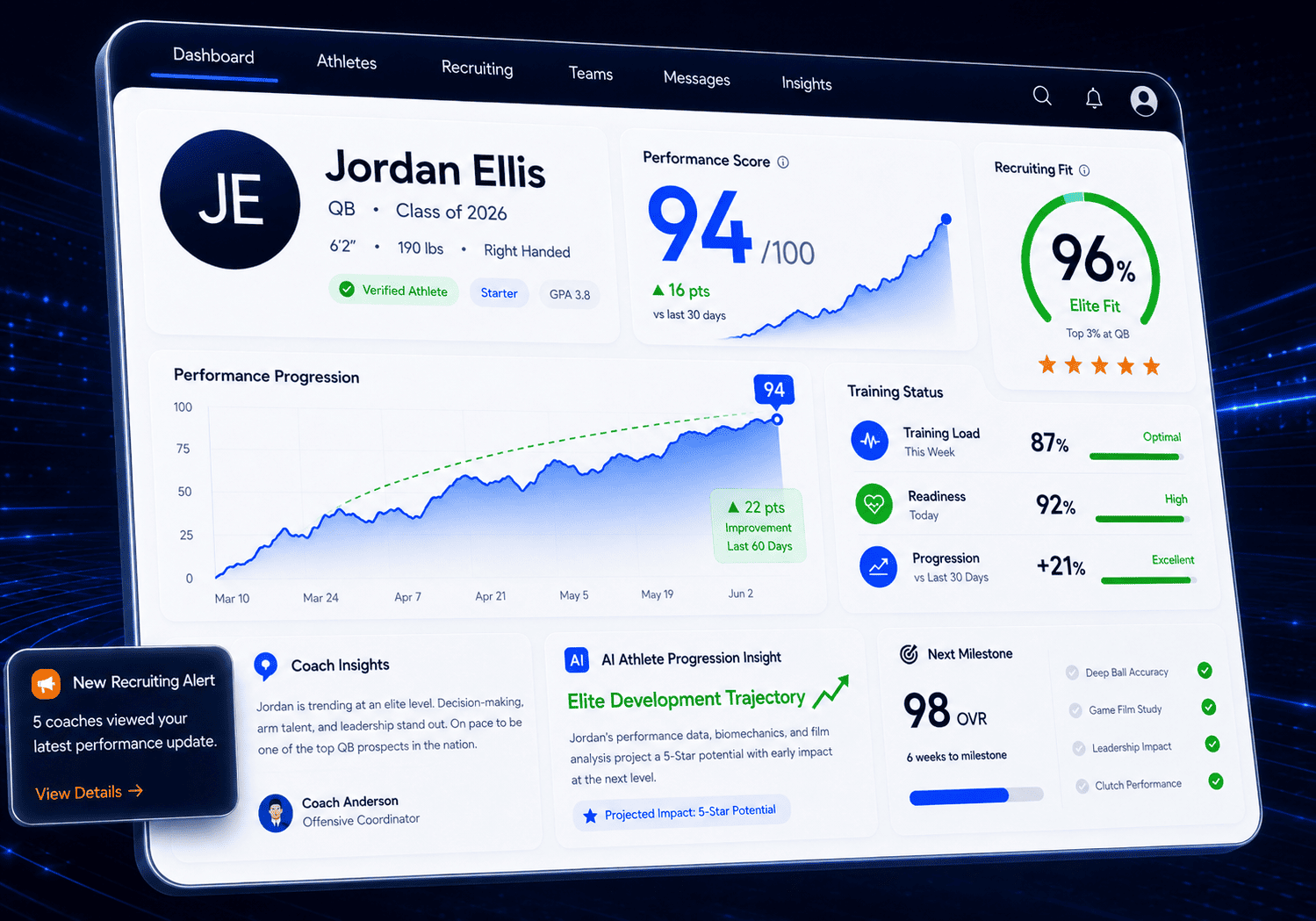
AI-Powered Sports Performance & Recruiting Platform for Virginia Clubs, Academies & Youth Programs

Plavno developed a custom sports technology platform for Virginia-based clubs and academies to combine athlete performance tracking, coach communication, recruiting workflows, and mobile engagement in one ecosystem.

Read More
3x

faster recruiting pipeline

AI-Powered Sports Performance & Recruiting Platform for Virginia Clubs, Academies & Youth Programs

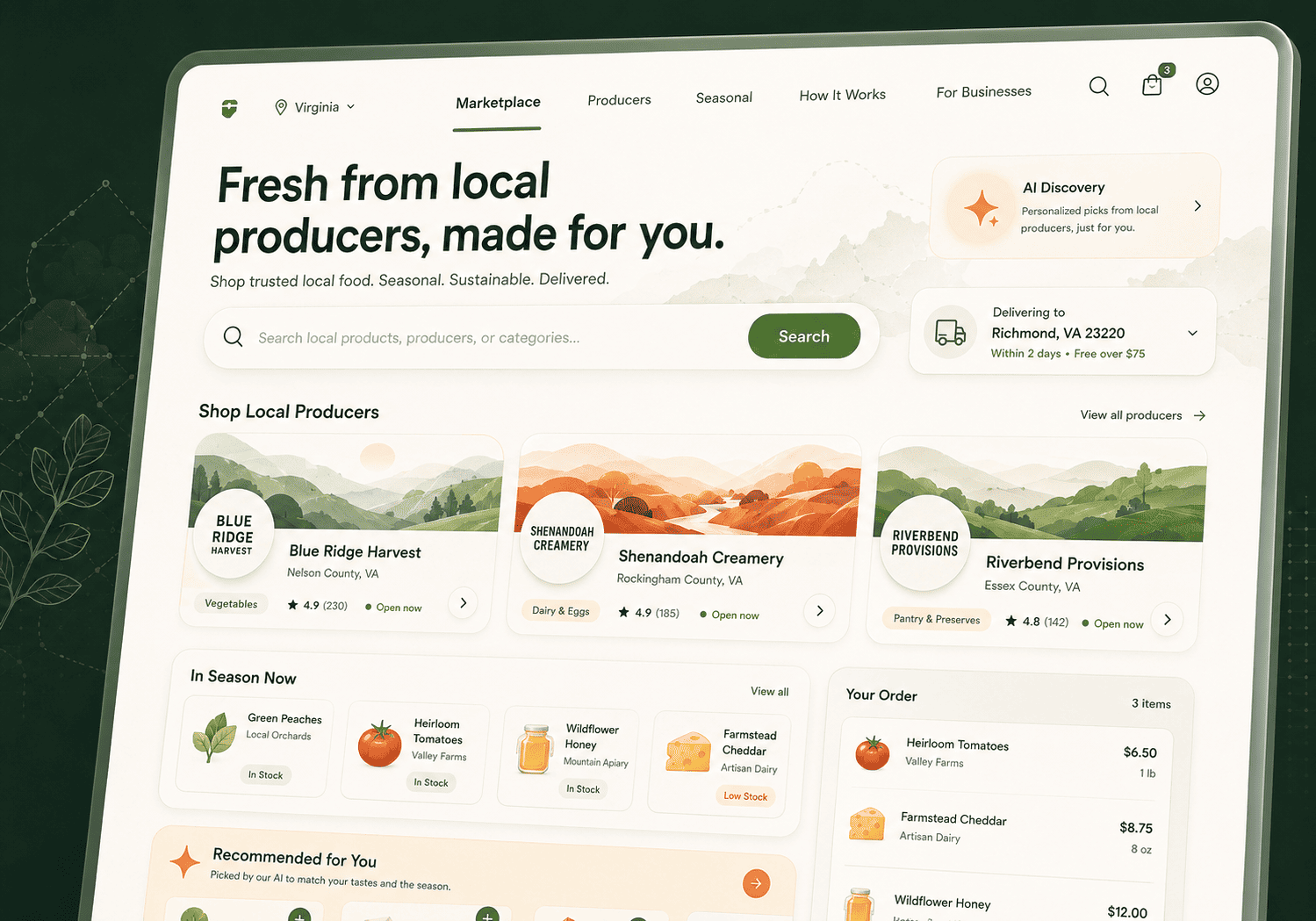
Digital Marketplace for Virginia Farmers, Local Producers & Direct-to-Consumer Food Sales

Plavno developed a custom multi-vendor marketplace for Virginia-based farmers, food producers, and regional sellers to unify product listings, vendor operations, customer ordering, and local fulfillment workflows.

Read More
3x

increase in product discovery relevance

Digital Marketplace for Virginia Farmers, Local Producers & Direct-to-Consumer Food Sales

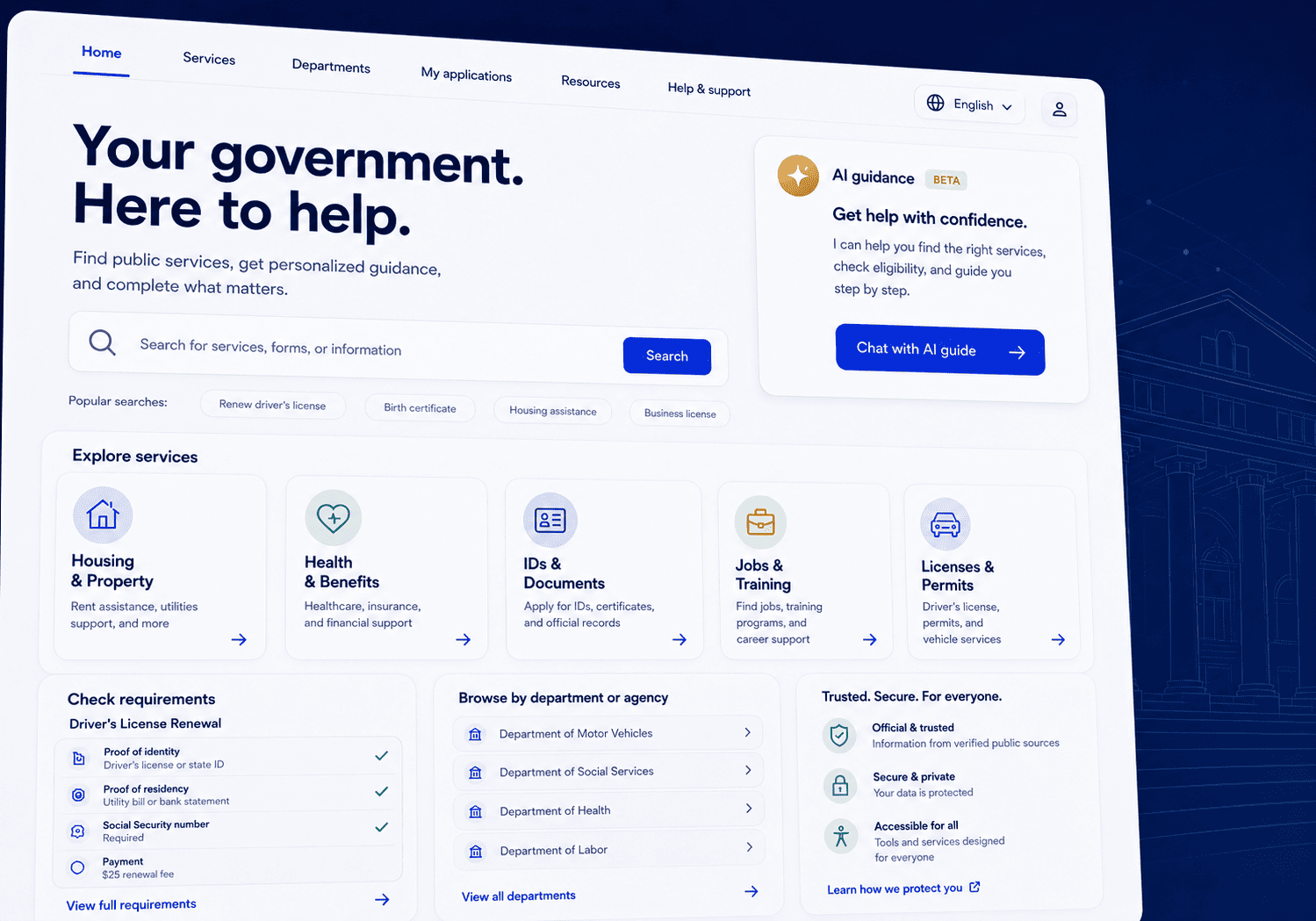
AI-Powered Citizen Services Website Platform for Virginia State Agencies

Plavno developed a modern eGovernment website platform for Virginia state agencies that centralizes citizen services, public information, department content, and an AI-powered guidance agent in one scalable system.

Read More
70%

reduction in routine citizen inquiries to agency staff

AI-Powered Citizen Services Website Platform for Virginia State Agencies

Why Engineering Matters

Why Chesapeake teams choose deep engineering over generic agencies

Most agencies connect two APIs and call it automation. We architect the full pipeline with monitoring and documentation.

Generic Agencies
Our Platform (Deep Engineering Expertise)
Connects CRM to basic email automation
checkmark
checkmark
Runs data quality audit before model training
checkmark
Monitors API rate limits with alerting
checkmark
Detects model drift post-launch
checkmark
Deploys via CI/CD with automated testing
checkmark
Delivers runbooks and documentation for handoff
checkmark
Relies on Zapier for critical integrations
checkmark

Data Pipelines & Integration Engineering

Connecting Salesforce, HubSpot, and your data sources without the usual headaches

Most CRM automation projects fail at the data layer, not the model layer where people expect problems. Your CRM data has duplicates, missing fields, inconsistent naming, and records that have not been touched in three years. We start every integration by cleaning and normalizing the data before connecting any models. A lead scoring model trained on dirty data produces confident wrong answers that erode trust quickly. We built this discipline on the freight quoting project where shipment records came from three different systems with incompatible field structures.

Integration complexity is where generic agencies lose momentum and projects stall. They connect two APIs and call it done. We architect for the reality that Chesapeake businesses run five to ten systems that need to stay in sync daily. Marketing automation sends to HubSpot while sales activity logs to Salesforce. Support tickets live in a separate helpdesk tool. The chatbot needs context from all three platforms to function properly. We build an event bus that routes data between these systems in real time rather than relying on nightly sync jobs that fail silently.

Latency is the silent killer of CRM automation projects. A lead scoring model that takes 12 seconds to return a result is useless for a live chat scenario where customers expect instant responses. We cache model outputs for common queries and use streaming inference for high-volume endpoints. The freight tracking agent we built returned quotes in under 3 seconds because we optimized the retrieval layer aggressively. For real estate lead nurturing, where speed to lead determines conversion rate, this is the difference between a booked showing and a voicemail that never gets returned.

API rate limits are the other constraint nobody warns you about until production breaks. Salesforce and HubSpot both throttle API calls based on your subscription tier and enforce limits strictly. We build queueing and batching logic that stays within rate limits while keeping response times acceptable for users. We monitor consumption in real time and alert before you hit a ceiling. This prevents the worst case where your automation stops working on the busiest day of the quarter because you exhausted your API budget.

We document every integration point and data flow in a system architecture diagram that lives in your repository alongside the code. When your team needs to add a new tool or remove an old one, the documentation shows exactly what depends on what. Technical debt in CRM integration compounds over time if it is not managed properly. Most companies we work with have inherited a spaghetti of Zapier connections and custom scripts from multiple contractors over the years. We replace that with a maintained, documented integration layer your team can extend.

Post-Launch Readiness

Five checks before your AI CRM automation goes live

  • Verify data quality baselines — Your automation will produce garbage if the data feeding it is wrong. Before launch, run a data audit that checks for duplicate contacts, missing required fields, and stale records older than 12 months. Fix the top three data quality issues identified during the audit. Set up automated validation rules that prevent bad data from entering the CRM going forward. Without this step, the automation will amplify existing data problems instead of solving them. Clean data is the foundation for every workflow that follows.

  • Test API rate limit headroom — Every CRM platform enforces API call limits based on your subscription tier. Run a 48-hour load test that simulates peak automation volume against your production CRM sandbox. Document the percentage of your API budget consumed by automation workflows during peak and off-peak hours. If usage exceeds 70 percent of your limit during testing, request a tier upgrade or add batching logic before launch. Hitting rate limits in production means your automation stops mid-workflow without warning.

  • Configure failure alerts and runbooks — Every automated workflow will eventually fail in production. The question is whether your team knows when it happens. Configure alerts that notify a designated operations contact when a workflow errors, a model endpoint times out, or a data sync breaks. Write a runbook for each failure scenario with the diagnostic steps and recovery actions needed. Test the alert pipeline by intentionally triggering a failure in staging to confirm notifications reach the right person.

  • Establish model drift monitoring — AI lead scoring and churn prediction models degrade over time as market conditions and customer behavior shift. Set up monitoring that tracks model prediction distribution against the baseline established during training. When the distribution shifts beyond a defined threshold, the system should flag the model for retraining immediately. Schedule a quarterly model review regardless of alert status to catch gradual degradation. Models that drift silently produce confident wrong answers that erode trust in the automation.

  • Document data retention and privacy compliance — Virginia businesses handling customer data must comply with applicable state and federal privacy regulations. Document what data the automation collects, where it is stored, how long it is retained, and who has access to each field. Map every data flow against your compliance requirements before launch day. Ensure that automated workflows do not store sensitive data in logs or temporary files unnecessarily. This documentation becomes your evidence during audits and protects your business from compliance gaps.

Vitaly Kovalev

Vitaly Kovalev

Sales Manager

Get Your CRM Automation Readiness Audit

Request a free readiness audit for your Chesapeake business. We review your CRM data quality, API limits, and integration points, then deliver a gap report with prioritized recommendations within five business days.

Talk to Experts

Architecture & Engineering Overview

Engineering decisions behind every AI CRM deployment

Manual Hours Reduced70%

60-80% drop in manual data entry, lead research, and follow-up scheduling within 90 days of launch

Silent Failure Visibility100%

Every action logged, every transition tracked, every failure generates an alert your team can act on

Cost Optimization85%

Model routing sends simple queries to cheaper models, reserving expensive inference for complex cases only

For Business: Technical ROI & Risk Mitigation

The ROI of CRM automation is measured in hours saved and deals captured, not in technology deployed. For Chesapeake businesses, the calculation is direct. Take the number of hours your sales team spends on manual data entry, lead research, and follow-up scheduling. Multiply by their loaded labor cost. That is your baseline and the number automation should reduce by 60 to 80 percent within 90 days of launch.

Risk reduction is the second metric that matters to business owners. Manual CRM processes fail silently because nobody tracks the gaps. A rep forgets to log a call and the deal history disappears. A lead falls through a stage transition and nobody notices for weeks. A follow-up reminder gets dismissed when the rep gets busy. With automation, every action is logged, every transition is tracked, and every failure generates an alert your team can act on.

The freight quoting AI agent we built illustrates this shift clearly. Before automation, quote requests sat in an inbox for hours while a rep manually looked up rates. After deployment, quotes returned in seconds and tracking updates flowed to customers without human action. The business impact was not a percentage improvement on a spreadsheet. It was a category shift from manual bottleneck to automated throughput that changed how the business operated.

Cost control is the third dimension that business owners must track. AI model calls, API usage, and infrastructure all carry ongoing monthly costs that grow with volume. We build cost monitoring into every deployment so you see the monthly bill before it surprises you. Threshold alerts trigger when costs spike unexpectedly. Model routing sends simple queries to cheaper models and reserves expensive inference for complex cases only. This keeps the automation affordable as volume grows over time.

The risk of not automating is real and compounding. Competitors who automate their CRM will respond faster, follow up more consistently, and lose fewer leads to neglect. In the Chesapeake market, where logistics and real estate competition is aggressive, the gap between automated and manual operations widens every quarter. Waiting another year costs more than building now.

1

Data Audit & Baselines

Measure current API consumption, data quality scores, and workflow completion rates before building anything

2

Governance & Ownership

Establish who owns automation, reviews model performance monthly, and adjusts scoring thresholds when conditions shift

3

Model Trade-off Analysis

Balance accuracy vs latency with production data: 94% at 4s or 90% at 200ms depending on live chat vs batch scenarios

4

Full Handoff & Control

Code, documentation, dashboards, and pipelines live in your repo within 90 days with zero artificial dependencies

For CTOs: Architecture & Technical Lifecycle

Every CRM automation project is a lifecycle decision, not a one-time implementation. The architecture you choose on day one determines your maintenance burden for the next three years. We design for change because CRM platforms, AI models, and business requirements all evolve on their own timelines. The systems we build use modular components with well-defined interfaces so that swapping a model or adding a new CRM field does not require a rewrite.

The lifecycle starts with a data audit that establishes your baseline metrics. We measure current API consumption, data quality scores, and workflow completion rates before building anything. These baselines become the comparison point for post-launch reporting and ROI validation. Without them, you cannot prove ROI to stakeholders or identify which automation produced the biggest impact. The audit also surfaces technical debt that will block automation if left unaddressed during development.

Governance is the decision point most CTOs overlook until problems appear. Who owns the automation when it goes live in production? Who reviews model performance on a monthly cadence? Who adjusts scoring thresholds when market conditions shift? We establish ownership during the project, not after launch. The runbooks, monitoring dashboards, and documentation we deliver are designed for a designated operations owner to take control within 90 days.

Trade-offs between accuracy and latency are the most common technical decision point. A complex ensemble model might score leads with 94 percent accuracy but take 4 seconds to return a result. A lighter gradient-boosted model might hit 90 percent in 200 milliseconds. For live chat scenarios, the faster model wins every time. For batch overnight scoring, the accurate model makes sense. We present these trade-offs with production data, not opinions.

The handoff plan is the final lifecycle milestone that defines project success. We do not maintain artificial dependencies that keep you locked into our services. The code, documentation, monitoring, and deployment pipelines live in your repository from day one. Your team can modify, extend, or replace any component without our involvement. We remain available for support but the system belongs to you and your infrastructure.

Orchestration Layer

Orchestration Layer

Python microservices behind an API gateway with independent scaling per concern: scoring, routing, enrichment, notification

Python
CRM Integration Layer

CRM Integration Layer

Official Salesforce and HubSpot SDKs with circuit breakers, retry logic, and rate limit management in a custom client layer

REST
Model Serving Layer

Model Serving Layer

Containerized endpoints for OpenAI streaming and local inference, chosen by data sensitivity and cost targets per workflow

OpenAI
Event Bus Layer

Event Bus Layer

Message broker decouples CRM from AI with replay capability and dead letter queues for permanently failed messages

Events

For Engineers: Implementation Details & Stack

The stack is Python, REST, and event-driven architecture chosen for maintainability over novelty. We use Python for orchestration because the data science ecosystem makes model serving and data transformation straightforward in production. The orchestration layer runs as a set of microservices behind an API gateway with independent scaling. Each service owns one concern: scoring, routing, enrichment, or notification. This separation makes debugging tractable when a workflow fails at 2 AM on a weekend.

For CRM integration, we use official Salesforce and HubSpot SDKs wrapped in a custom client layer. The client layer handles authentication, retry logic, and rate limit management without leaking those concerns into business logic. We chose official SDKs over generic connectors because vendor API changes surface faster through official channels. The client layer adds circuit breaker patterns so a CRM outage does not cascade into a full system failure. Every API call is instrumented with timing and error metadata for observability.

Model serving runs on containerized endpoints deployed within your cloud environment. For OpenAI-based models, we use the official API with streaming responses for conversational workloads where latency matters. For open-source alternatives, we deploy inference servers locally. The choice depends on data sensitivity and cost targets for each workflow. Models that process PII run inside your tenant exclusively. Models that handle generic text classification can call external APIs safely.

The event bus is the backbone of the architecture and the component most teams get wrong. We use a message broker to route events between CRM triggers and model endpoints. This decouples the CRM from the AI layer, which means a CRM platform upgrade does not break your automation pipeline. The bus also provides replay capability for failed messages so nothing is lost during outages. Dead letter queues capture messages that fail permanently for manual investigation.

Testing is non-negotiable in our process. We write integration tests against a CRM sandbox that mirrors your production schema exactly. We use contract testing to validate that API responses match expected shapes before deployment. When the freight quoting agent shipped, it passed 40-plus integration tests covering quote generation, tracking lookups, and error handling before touching production data. This test suite runs on every deployment automatically.

Observability

Observability

Structured logging, metrics, and distributed tracing from the first commit across every component

Monitoring

Monitoring

Rate limit consumption, model drift tracking, workflow completion rates, and cost per endpoint

Security

Security

Encryption at rest and in transit, least-privilege access, HIPAA and CMMC compliance mapping

Incident Response

Incident Response

Runbooks for top five failure scenarios with tabletop exercises rehearsed before launch day

Infrastructure, Observability & Security

Observability and security are deployed together because you cannot secure what you cannot monitor. We instrument every component with structured logging, metrics, and distributed tracing from the first commit. Logs flow to your existing log management system without requiring a new vendor relationship. Metrics feed into dashboards that show API call volume, model latency, error rates, and cost per workflow. Tracing lets us follow a single lead from CRM trigger through model scoring to notification dispatch.

What we monitor is specific to CRM automation use cases, not generic infrastructure metrics. API rate limit consumption gets its own dashboard because exceeding limits means automation stops entirely. Model drift tracking compares prediction distributions against training baselines to catch degradation early. Workflow completion rates show whether automated sequences finish or stall at a specific step repeatedly. Cost monitoring tracks spend per model endpoint so you know which automation is expensive and which runs cheaply.

Security follows least-privilege and data minimization principles throughout the stack. CRM data contains PII, financial details, and business relationships that demand protection. We encrypt data at rest and in transit using industry-standard protocols with keys managed in your cloud provider. Access to the automation infrastructure is restricted to named individuals with audit logging enabled. For Virginia companies in healthcare or defense contracting, we map data flows against HIPAA or CMMC requirements and document compliance posture thoroughly.

Incident response is defined before launch, not during an outage when stress is highest. We write runbooks for the top five failure scenarios: CRM API outage, model endpoint failure, rate limit exhaustion, data sync corruption, and authentication failure. Each runbook lists symptoms, diagnostic steps, and remediation actions in plain language. During the first 30 days, we run a tabletop exercise with your operations team to rehearse the response to a simulated failure scenario.

Deployment runs through CI/CD pipelines with automated testing gates that block bad code. No code reaches production without passing the full test suite first. Rollback procedures are tested in staging on a monthly cadence to ensure they work when needed. For US-based clients, all infrastructure runs in US regions to meet data residency requirements. The monitoring stack is designed for a small operations team to manage without a dedicated DevOps hire.

Automation Maturity Model

Four stages from manual CRM to autonomous operations

Most Chesapeake companies are stuck at stage one. We move them through each phase with clear exit criteria and measurable progress.

Clipboard
Team
01

Stage 1: Manual CRM Operations (current state)

Your team logs into Salesforce or HubSpot and enters data by hand every day. Lead prioritization is based on instinct and recency rather than data. Follow-up reminders are calendar alerts that reps dismiss when they get busy. Marketing sends the same email to every contact on the list regardless of their stage. Data quality degrades because no one has time to audit records. This stage costs more in lost deals than most Chesapeake companies realize.

02

Stage 2: Assisted CRM (2-4 weeks to implement)

We deploy lead scoring models that rank opportunities by conversion probability. Reps still work the deals but the system surfaces which ones matter first. Basic workflow automation sends triggered emails when a lead takes a specific action on your site. Data validation rules prevent bad records from entering the CRM going forward. This phase delivers visible ROI quickly because your team feels the reduction in manual triage immediately.

Search in doc
Rocket
03

Stage 3: Automated CRM (4-8 weeks to implement)

The system now handles multi-step workflows without human intervention on routine tasks. Lead routing assigns opportunities to reps based on territory and deal size automatically. Customer retention automation flags at-risk accounts and triggers save workflows without manual triggers. Marketing segments audiences using predicted lifecycle stage rather than manual tagging processes. For the freight quoting client, this stage meant quotes returned in seconds and tracking updates flowed automatically. Reps manage exceptions, not routine tasks.

04

Stage 4: Autonomous Customer Operations (8-12 weeks)

AI agents handle end-to-end customer interactions with human oversight for edge cases. A chatbot on your site qualifies leads, books meetings, and syncs everything to CRM records instantly. The system detects churn signals and triggers personalized retention outreach based on behavioral patterns. Models retrain automatically as new data flows into the pipeline. Your team shifts from operating the CRM to improving it strategically. This is where the house-hunting platform landed after full deployment.

Eugene Katovich

Eugene Katovich

Sales Manager

Need a custom software solution? We’re ready to help!

Plavno has a team of skilled developers ready to tackle the project. Ask me!

Get a Free Quote

Common Questions

AI CRM automation questions from Chesapeake businesses

Answers to the technical and operational questions Virginia companies ask before starting an automation project.

What drives the cost of AI CRM automation for Chesapeake businesses?

The cost of AI CRM automation depends on three factors: the number of systems you need integrated, the complexity of the workflows, and the volume of data your models process. A Chesapeake logistics company automating quote generation across three systems costs more than a real estate office automating email follow-ups in HubSpot alone.

Most projects in the Virginia market range from 8 to 16 weeks of engineering time. Salesforce AI integration tends to cost more than HubSpot automation because the Salesforce API surface is larger and the data model is more complex. Teams that need custom chatbot to CRM integration should budget for an additional two to four weeks of development.

Ongoing costs include model inference, API usage, and infrastructure hosting. We build cost monitoring into every deployment so you see monthly spend before it surprises you. Model routing sends simple queries to cheaper endpoints and reserves expensive inference for complex cases. This keeps operational costs predictable as your automation volume grows over time.

We provide a fixed-scope quote after the discovery phase concludes. Discovery typically takes one to two weeks and costs a fraction of the total project. You receive a technical specification, timeline, and budget before committing to the full build.

How long does it take to build AI CRM automation software?

An MVP for AI CRM automation takes four to six weeks to build and deploy. This typically covers lead scoring on a single CRM platform, basic workflow automation, and a monitoring dashboard for your team. The MVP is designed to prove ROI before you commit to scaling to full deployment.

Full deployment takes eight to sixteen weeks depending on integration complexity. For Chesapeake businesses running both Salesforce and HubSpot, the integration layer alone can take three weeks to build and test. Adding customer retention automation and chatbot to CRM integration extends the timeline further.

The freight quoting AI agent we built took approximately twelve weeks from discovery to production deployment. That included quote automation, tracking workflow orchestration, and email integration with existing systems. The house-hunting platform followed a similar timeline because the recommendation engine required multiple data sources to function correctly.

Speed depends on data readiness more than any other factor. If your CRM data is clean and your API access is properly configured, we move faster. If we need to audit and clean data first, discovery extends by one to two weeks. We never skip the data audit because models trained on bad data produce confident wrong answers that undermine trust.

We work in two-week sprints with weekly demos so you see progress every week rather than waiting months for a deliverable.

What data do we need before starting an AI lead scoring project?

A workable AI lead scoring model needs at least 18 months of historical deal data in your CRM. We need closed-won and closed-lost records with associated activities including emails, calls, meetings, and notes. The model learns which patterns correlate with won deals and scores new leads accordingly using those historical patterns.

For Chesapeake companies with thin historical data, we supplement with firmographic enrichment from third-party providers. We pull company size, industry, and revenue signals to give the model enough features. This produces useful scores even if your deal volume is low. The freight quoting project worked with shipment records rather than traditional sales pipeline data. We adapted the same scoring approach to rank inbound quote requests by likelihood to convert.

Marketing automation with AI requires email engagement data including opens, clicks, and conversions. The system uses this to predict which content resonates with which audience segments. Without email history, the model starts cold and improves as it collects interaction data over the first 30 days of operation.

Data quality matters more than data volume in every project we have delivered. A clean dataset of 500 deals with complete activity records outperforms a messy dataset of 5,000 incomplete records. We audit your data during discovery and identify what needs fixing before model training begins.

How do you measure whether CRM automation is actually working?

We establish baselines during discovery and compare against them every 30 days post-launch. The primary metric for AI lead scoring is lift: do scored leads convert at a higher rate than unscored leads. A model that produces scores but does not improve conversion rates is not working, regardless of its accuracy metrics on paper.

For sales automation, we measure time-to-first-touch and follow-up completion rate as the core metrics. Manual processes lose leads because reps forget or prioritize incorrectly under pressure. Automation should cut time-to-first-touch from hours to minutes and increase follow-up completion to near 100 percent.

For customer retention automation, we measure churn rate reduction against a control group. The system flags at-risk customers before they cancel or lapse. We compare the churn rate of flagged-and-intervened accounts against flagged-and-ignored accounts. This is the cleanest measurement of whether the retention automation produces actual business value.

We deliver a monthly performance report that shows every metric against its baseline in a single dashboard. If the numbers do not improve, we adjust the model thresholds, retrain on new data, or redesign the workflow. We do not declare success until the metrics prove it in production, not in staging environment tests.

How do you handle data privacy and compliance for Virginia companies?

Virginia companies handling customer data must comply with applicable state and federal privacy regulations. We design every CRM automation deployment with data minimization as a core engineering principle. The system should only collect and process data that the automation actually needs to function correctly.

For healthcare-adjacent businesses in the Chesapeake area, we map data flows against HIPAA requirements systematically. This means encrypting PII at rest and in transit, restricting access to named individuals with audit logging, and ensuring that AI model endpoints do not store sensitive data outside your tenant. For defense contractors, we evaluate CMMC requirements and keep infrastructure within US regions to meet data residency rules.

Model hosting is a key compliance decision that we make early in the project. If your data includes PII or financial details, we run open-source models inside your cloud environment exclusively. If the automation only processes generic text classification, we can use external APIs like OpenAI. The choice depends on what data the model sees and what regulations apply to your business.

We document every data flow in a system architecture diagram that shows where data enters, where it is processed, where it is stored, and how long it is retained. This documentation serves as your evidence during audits and compliance reviews. Access controls follow least-privilege principles with role-based permissions and quarterly access reviews.

Contact Us

This is what will happen, after you submit form

Need a custom consultation? Ask me!

Plavno has a team of experts ready to start your project. Ask us!

Vitaly Kovalev

Vitaly Kovalev

Sales Manager

Schedule a call

Get in touch

Fill in your details below or find us using these contacts. Let us know how we can help.

No more than 3 files may be attached up to 3MB each.
Formats: doc, docx, pdf, ppt, pptx, xls, xlsx, txt.
Send request