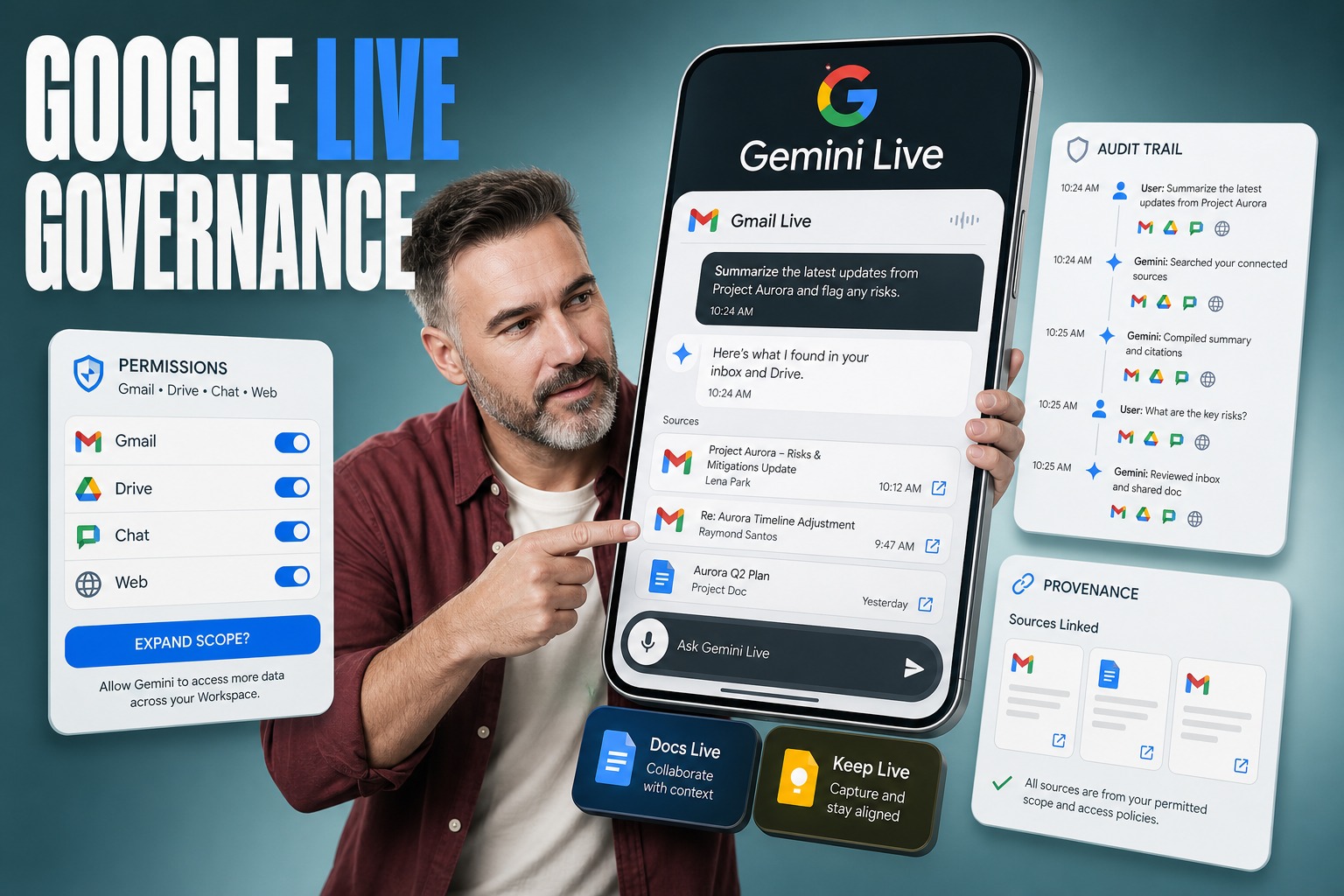
What’s the dominant shift this week? → Google is rolling out Gemini-powered ‘Live’ voice modes for Gmail, Docs, and Keep on mobile, turning everyday productivity work into real-time conversations.
What business decision does this force this quarter? → Whether to allow voice-first, conversational access to email and documents before Workspace-wide controls and governance patterns are fully clarified.
What’s the primary search question we’re answering? → Should our organization adopt Gmail Live, Docs Live, and Keep Live, and what architecture and governance do we need for voice-based access to productivity data?
What’s the non-obvious engineering risk? → The hard part isn’t speech or the LLM; it’s authorization, provenance, and audit when a single conversation can pull from Gmail, Drive, Chat, and the web.
What’s the position we’re taking at Plavno? → Live voice assistants change enterprise search into an interactive, cross-app decision surface, so teams should treat rollout as an identity-and-audit program first, not a UI upgrade.
Google just moved the ‘search bar’ into your mouth—and that breaks how enterprises govern knowledge
Gmail Live, Docs Live, and Keep Live push Gemini Live-style real-time conversation into core work apps on mobile, with global English rollout starting now and Workspace business availability described as coming soon. Our central claim is that this shift breaks traditional ‘search-and-read’ governance because a single spoken thread can summarize, combine, and reframe content across Gmail, Drive, Chat, and the web—so the right response is to design permission boundaries, provenance cues, and audit expectations before broad enablement.
- The interface becomes continuous, not transactional. A conversation persists across follow-ups and interruptions, which changes how users discover and act on sensitive information.
- Summaries become the default output. Gmail Live surfaces details from long threads by summarizing and linking sources in an onscreen transcript, which creates a new ‘derived data’ layer.
- Cross-system context becomes normal. Docs Live can pull from Gmail, Drive, Chat, and the web if granted permission, turning document creation into an integration problem.
- Mobile-first implies unmanaged environments. The rollout is explicitly on iOS and Android, where device posture and user context vary widely.
- Workspace enablement will lag the consumer experience. With business availability ‘coming soon,’ many teams will face shadow adoption pressure first.
Quick Answer: Should we enable Gmail Live, Docs Live, and Keep Live for our organization?
Enable them only if you can treat voice conversations as a governed access path to enterprise knowledge: tightly scoped permissions, clear provenance (users can see which emails were used), and an operational stance that assumes follow-up questions can broaden data exposure. If you cannot yet enforce or observe those boundaries in your Google Workspace environment, the safer near-term posture is limited pilots with explicit data classes and user groups, rather than broad rollout.
- If your biggest pain is finding details buried in threads. Gmail Live is designed to surface specifics from lengthy email conversations without keyword hunting.
- If you create proposals and summaries from scattered sources. Docs Live’s ability to format ideas and pull from Gmail, Drive, Chat, and the web (with permission) is the core differentiator.
- If note capture happens while users are moving. Keep Live turns natural speech into contextualized notes, especially on Android where it is explicitly supported.
- If you have strict data-handling rules. Treat ‘summarize verbally’ as a new distribution channel; it can be risk-reducing or risk-amplifying depending on controls.
- If you can run a controlled pilot. The cleanest path is to pilot on mobile, in English, with narrow scopes aligned to existing permission models.
The real innovation is conversational continuity across apps, not ‘voice commands’
Most enterprises already understand voice input and dictation. What’s new in Gmail Live, Docs Live, and Keep Live is conversational continuity: you can ask follow-up questions without restarting, and you can interrupt mid-sentence to pivot. In practice, that turns Gmail from a mailbox into an interactive memory system and Docs from a writing tool into a synthesis endpoint.
From an engineering perspective, this is an orchestration story: the assistant must select sources, summarize them, present provenance in the transcript, and keep state across turns. Those are the same concerns we see in production agent systems—state, tool choice, and retrieval quality—only now they show up inside the default productivity suite instead of a custom app.
- Stateful interaction changes data exposure. A follow-up question can widen scope from a single thread to ‘wherever it was sent,’ which can surprise users.
- Provenance becomes part of the UI contract. Gmail Live links email sources in an onscreen transcript; if that breaks, trust breaks.
- Interruptibility forces deterministic boundaries. If users can cut the assistant off mid-response, the system still needs to preserve what was accessed and why.
- Personalization becomes a permissions problem. Docs Live only pulls from Gmail, Drive, Chat, and the web ‘if granted permission,’ which is the critical phrase.
- Mobile constraints become architectural constraints. Real-time conversation on iOS and Android pushes latency, caching, and session handling into the foreground.
Gmail Live turns email search into an answer engine with receipts
Gmail Live is positioned to extract details from your inbox without relying on subject lines or keywords, then speak a summary back while showing the source emails in the transcript. That ‘receipt’ model is the first governance-friendly pattern we’ve seen for voice summarization in a mainstream inbox: the assistant is not only answering, it is also pointing to what it used. The trade-off is that users may over-trust the summary and under-check the sources.
Docs Live turns document writing into a data-integration surface
Docs Live can structure a document from conversational description and can summarize longer documents. The operational twist is that, with permission, it can pull information from Gmail, Drive, Chat, and the web to personalize outputs. The moment you allow that, you’ve effectively created a multi-source content pipeline where mistakes are rarely ‘wrong formatting’ and more often ‘wrong source selection,’ which is harder to detect after the fact.
| Live mode | What it does (from the rollout details) | What engineers should assume changes operationally |
|---|---|---|
| Gmail Live | Surfaces details from inbox threads and responds verbally with an onscreen transcript linking email sources | Email access becomes conversational and stateful, so follow-ups can expand scope beyond a single thread |
| Docs Live | Formats conversational ideas into structured docs and can summarize longer documents; can pull from Gmail, Drive, Chat, and the web with permission | Document generation becomes a multi-system retrieval-and-synthesis workflow, not just a writing feature |
| Keep Live | Transcribes natural speech and contextualizes notes without requiring specific words | Note capture becomes implicit classification; teams should expect messy, conversational input to become stored knowledge |
Why this breaks the old model of enterprise search and knowledge management
Traditional enterprise search assumes a user is scanning results, opening documents, and forming their own conclusion. Gmail Live flips that: it gives the conclusion first, then optionally shows sources in the transcript. That is not inherently bad—often it’s better—but it changes how errors manifest. Users will remember the spoken answer, not the caveats.
Docs Live goes further by allowing the assistant to draft a business proposal or a structured document from conversation and optionally pull in context from Gmail, Drive, Chat, and the web if granted permission. In practice, that collapses discovery, synthesis, and publishing into a single session. For engineers, it means the governance surface shifts from ‘who can open a file’ to ‘what can be pulled into a response and how do we prove it later.’
| Old pattern | Live voice pattern | Practical impact on engineering decisions |
|---|---|---|
| Search results list | Single conversational answer | Observability must cover answer provenance, not just query logs |
| User assembles context manually | Assistant assembles context across sources | Permissions must be consistent across Gmail, Drive, and Chat scopes |
| Reading is the bottleneck | Speaking and listening are the bottleneck | UI/UX must communicate source links and uncertainty quickly |
| One query at a time | Follow-ups and interruptions | Session state becomes a first-class security and compliance concern |
The engineering failure mode is almost always ‘scope creep across turns’
Google highlights that you can ask Gmail Live follow-up questions without starting a new conversation and can interrupt it mid-sentence. That sounds like a convenience feature, but it is the exact place where production systems drift. A user starts with ‘when is my kid’s next school event?’ and then pivots into ‘who else is invited?’ or ‘what’s the address?’ The system is incentivized to expand retrieval to satisfy the new intent.
In an enterprise setting, scope creep shows up as accidental over-collection: pulling from more threads than expected, pulling from Drive when the user thought they were only using Gmail, or pulling web context that introduces unvetted information. The fix is not ‘pick a safer model.’ The fix is to define and enforce scope boundaries per session and per tool, and to ensure the UI consistently shows what was used—similar to Gmail Live’s linking of email sources in the transcript.
Define the session boundary up front. Decide whether a conversation is limited to a mailbox, a label, a time window, or a project context, and treat follow-ups as constrained refinements.
Make source expansion explicit. When the assistant needs to broaden from a thread to ‘wherever it was sent,’ require a user-visible cue and keep the transcript tied to sources.
Separate ‘drafting’ from ‘publishing.’ For Docs Live-style workflows, treat the assistant output as a draft that must preserve citations or pointers to origin systems.
Assume interruptions create partial states. If a user interrupts mid-answer, the system still accessed something; your audit stance should reflect that.
Treat web pull-ins as a different trust zone. If Docs Live uses web context, handle it as external data even if it is blended into a single paragraph of output.
Mobile rollout first means your threat model starts with the device, not the tenant
These Live modes are rolling out to mobile platforms globally in English starting today, with Gmail Live available on iOS and Android for Google AI Plus, Pro, and Ultra plans, and Docs Live and Keep Live coming to AI Pro and Ultra plans. Keep Live is described as Android only, while Docs is available on both iOS and Android. Workspace business customers are told these are coming soon, which implies many organizations will see employees experience this in personal contexts before it’s formally governed at work.
From an operational standpoint, mobile-first matters because it shifts usage into unmanaged environments: shared family tablets, personal phones, cars, airports, and meetings. Even if the underlying permissions are correct, spoken output can leak. The practical engineering response is to treat voice as a new data egress channel and to design policies around where speaking is safe, not only what data is accessible.
- Acoustic privacy becomes part of policy. A spoken summary in an open office is a different exposure path than a screen-only search result.
- Session persistence is a real risk. If the assistant supports follow-ups, users may keep a conversation open longer than intended.
- Platform differences will fragment rollout. Keep Live being Android only forces separate enablement and support stories across device fleets.
- Plan tiers create uneven adoption. Availability tied to AI Plus, Pro, and Ultra plans can create shadow IT behavior if work accounts lag.
- Workspace timing uncertainty complicates governance. ‘Coming soon’ is enough to trigger stakeholder pressure without giving engineers time to harden controls.
What ‘permission to pull from Gmail, Drive, and Chat’ really means in production
Docs Live is described as being able to pull information from Gmail, Drive, Chat, and the web if granted permission. That phrase hides the core engineering work: permission is not just a checkbox. It is the intersection of identity, app scopes, data classification, and user intent. If those systems disagree, the assistant becomes the first place where inconsistencies surface.
At Plavno, when we build or integrate agentic systems, we treat tool permissioning as a product in itself, not a setup step. The moment a conversational system can mix sources, you need an explicit stance on provenance, citations, and reversibility. If a draft business proposal is created from mixed internal and web context, you need to be able to trace what came from where, even if the user only experiences a clean paragraph of text.
| Decision you must make | Why Live voice changes it | What a practical stance looks like |
|---|---|---|
| Scope of retrieval | Follow-ups encourage expanding search beyond the original ask | Constrain sessions by app and context; require visible cues before widening |
| Provenance expectations | Summaries are consumed faster than sources are checked | Preserve source links in transcripts and treat them as part of the output contract |
| Internal vs external context | Docs Live can pull from the web with permission | Keep external context logically separated so review and approval can catch it |
| Cross-app consistency | Docs Live can pull from Gmail, Drive, Chat | Align permission models so ‘allowed in Drive’ doesn’t contradict ‘allowed in Chat’ |
The transcript is not UX polish; it’s your compliance artifact
Gmail Live’s on-screen transcript linking email sources is the most governance-relevant detail in the rollout description. In enterprise terms, it’s a lightweight citation system. If you adopt these features, treat that transcript behavior as non-negotiable: it is how a user can validate the assistant’s answer and how an organization can argue that outputs were grounded in accessible messages rather than invented context.
‘Summarize and speak it back’ creates a new derived-data layer
Even when the assistant only uses data the user can access, the summary itself can become more sensitive than any single email because it compresses context. A long thread might contain scattered details; a spoken answer can assemble them into a single actionable statement. The rollout’s emphasis on surfacing details without digging implies that derived-data handling—how summaries are stored, shared, or repeated—will matter as much as underlying access rights.
If you can’t show a user exactly which sources were used, you don’t have a voice assistant—you have an un-auditable data transformation pipeline.
The adoption playbook is not ‘turn it on’—it’s ‘choose which knowledge you’ll allow to be spoken’
Because these Live modes are explicitly designed for being on the move or unable to work manually, organizations should assume they will be used in contexts where screens are secondary. That means the most important decision is not whether Gmail Live can find the right email; it’s which categories of information your organization is comfortable having summarized aloud.
We recommend treating early adoption as a narrow governance experiment: pick workflows where spoken summaries reduce risk rather than increase it. For example, summarizing meeting logistics from a known thread might be acceptable, while summarizing HR, legal, or financial topics in public settings might not. This is less about mistrusting Gemini and more about acknowledging that voice changes where information travels.
- The ‘spoken allowed set’ is smaller than the ‘read allowed set.’ Users can read in private; they may speak and listen in public.
- Knowledge boundaries must match how people work. Mobile usage implies commuting, walking, and meetings where privacy is inconsistent.
- Provenance needs to be glanceable. If the transcript links sources, users must be trained to check it quickly.
- Docs drafting needs an approval story. If proposals are created conversationally, review must still catch source-mixing problems.
- Keep capture needs data hygiene. Contextualized notes are useful, but they can become a new store of sensitive detail if unmanaged.
Voice-first productivity is an access channel; treat it like adding a new API to your company’s knowledge base.
Where engineering teams should spend effort: identity, logging, and source boundaries
Teams often ask us whether they need a better model to make assistants safe. With Gmail Live and Docs Live, the more immediate question is whether your identity and audit posture can handle conversational access. Follow-up questions and interruptions make interaction non-linear, so the system must still behave predictably with respect to what it can access.
If you’re building internal equivalents or extensions, focus on the control plane: the policies that decide which tools can be used, what sources can be pulled, and how outputs reference inputs. This is the same engineering discipline we apply in AI agents development: tool boundaries, provenance, and observability determine production reliability more than model selection does.
Start by mapping data domains to voice suitability. Decide which Gmail labels, Drive folders, or Chat spaces are acceptable for spoken summarization.
Require persistent provenance for every answer. Adopt the ‘transcript with sources’ expectation as a baseline, not a nice-to-have.
Design for turn-by-turn scope control. Make it hard for follow-ups to silently broaden retrieval without a visible cue.
Treat drafting as a staged process. Docs Live-style generation should preserve where claims came from so reviewers can validate.
Operationalize incident response around conversations. Plan for ‘the assistant said something it shouldn’t’ as a real incident category.
If your governance can’t keep up with a multi-turn conversation, your safest option is to limit the assistant to single-turn, single-source interactions.
Real-world applications that are worth piloting first (and why)
The best early pilots are the ones where the assistant’s summarization and retrieval reduce user error rather than introduce new ambiguity. Gmail Live’s core promise is surfacing details from lengthy threads; that can be valuable when the ‘needle in the haystack’ is logistical rather than sensitive. Docs Live’s promise is turning conversational descriptions into structured documents and summarizing long content; that can accelerate drafting when the organization already has a strong review step.
Keep Live’s value is capture while moving, turning natural speech into contextual notes without specific phrasing. That is particularly useful in field work, sales, or operations contexts, but Android-only availability should shape which groups you target first. In every case, the point of the pilot is to validate governance: can users understand what the assistant used, and can you explain outputs later if challenged?
| Pilot scenario | Why Live mode fits | The trade-off you must manage |
|---|---|---|
| Meeting logistics triage | Gmail Live can summarize dates, locations, and key details from long threads | Spoken output can leak in shared spaces; train users to use transcripts and headphones |
| Proposal drafting from internal sources | Docs Live can structure a document from conversation and pull from Gmail/Drive/Chat with permission | Source mixing can create subtle inaccuracies; require review with provenance expectations |
| Field note capture | Keep Live transcribes natural speech and contextualizes notes | Notes can become a sensitive repository; define retention and access expectations |
| Summarizing long internal docs | Docs Live can summarize longer documents | Summaries can omit nuance; establish when the full doc must be referenced |
How ‘interrupt mid-sentence’ changes your human workflow
Interruption is a productivity win because it matches how people think. But in a work context, it also means users will treat the assistant like a colleague and expect it to adapt instantly. That’s where misunderstandings happen: the assistant may shift retrieval scope based on an abrupt pivot. If you pilot these tools, watch for conversations where the user’s intent changes faster than the system’s implicit scope.
Why Keep Live can quietly become your org’s unofficial memory
Keep Live is designed to contextualize notes without requiring specific words or explanations. That is excellent for capture, but it also means the note system can accumulate semi-structured operational knowledge fast. If your organization already struggles with ‘tribal knowledge’ living in personal notebooks or chat messages, Keep Live may accelerate that trend unless you intentionally connect notes to governed workflows.
A good pilot outcome is not ‘users loved it’; it’s ‘we can explain exactly what it accessed, and we can bound what it will access next.’
The risk profile is not hypothetical: it’s baked into the feature design
The rollout description emphasizes convenience: surfacing inbox details without digging, drafting structured documents from conversational descriptions, and transcribing natural speech into contextualized notes. Each of those implies a system that prioritizes completion and fluency. In enterprise settings, that creates three predictable risk categories: over-broad retrieval, over-confident summarization, and accidental egress through spoken output.
We should be clear: none of these risks require the assistant to ‘hack’ anything. They occur even when permissions are correct, because the user’s mental model is often narrower than their account’s access rights. The engineering response is to align mental models with system behavior by making scope visible, provenance unavoidable, and review steps explicit—especially when Docs Live pulls from multiple internal systems and the web.
- Over-broad retrieval in follow-ups. Stateful conversation makes it easy to expand from one thread to many without the user noticing.
- Summaries that compress sensitive context. A spoken answer can assemble scattered details into a single sensitive statement.
- Cross-app permission surprises. ‘Granted permission’ can still surprise if users don’t realize what that permission enables.
- Web blending into internal drafts. If web context is pulled, it can become indistinguishable from internal facts in a proposal.
- Mobile speaking as egress. The output channel itself is risky when used in public or semi-public environments.
If you adopt Live modes, define ‘safe failure’ as refusing to answer beyond scope, not as answering quickly with partial grounding.
What Plavno would ask a CTO before enabling this across a regulated org
If you operate in regulated or high-sensitivity domains, you should treat Gmail Live and Docs Live as introducing a new class of interaction with enterprise records: conversational retrieval and synthesis. The core question is whether your org can defend, after the fact, why a given answer was produced and what it drew from. Gmail Live’s transcript linking sources is a strong starting point, but your compliance story needs to cover multi-turn scope changes.
This is where we often bring security engineering into the product conversation early. Even if Workspace availability is ‘coming soon,’ the organizational pressure will arrive immediately. Tie your evaluation to your existing control programs and testing discipline—many teams start by pairing pilots with cybersecurity and penetration testing approaches to validate that the new access paths behave as expected under real usage patterns.
| CTO question | Why it matters for Live voice | What an acceptable answer sounds like |
|---|---|---|
| Can we bound what a conversation can access? | Follow-ups can broaden scope | ‘Yes, sessions are constrained by app/data domain and expansion is user-visible’ |
| Can users see and verify sources quickly? | Summaries are consumed faster than sources | ‘Transcripts include sources and users are trained to validate in-context’ |
| What happens when the assistant is interrupted? | Partial responses still imply data access | ‘We can audit what was accessed even if the output was cut short’ |
| How do we treat web context in drafts? | Docs Live can pull from the web with permission | ‘External context is marked and reviewed before publishing internally’ |
The ‘coming soon for Workspace’ gap is where shadow adoption will grow
Because Gmail Live is available for users on Google AI Plus, Pro, and Ultra plans and Docs/Keep Live are tied to AI Pro and Ultra, employees may encounter the experience outside official business accounts first. That time gap is operationally important: it’s when teams need messaging, policy, and a defined pilot path, so adoption happens through governance rather than through personal experimentation leaking into work practices.
Treat Docs Live like a publishing system, not a writing assistant
Docs Live can format ideas into structured documents, including business proposals, and can pull from multiple internal systems and the web if granted permission. That is closer to a publishing pipeline than a writing tool. The review and approval model should reflect that. If you already require approvals for externally facing documents, assume the assistant increases throughput and therefore increases the chance of unreviewed drafts being shared prematurely.
Your success metric should be: fewer manual searches without increasing the number of untraceable summaries circulating inside the company.
How to evaluate Live voice workflows in practice without waiting for perfect clarity
In practice, teams rarely get perfect documentation timing for new UX capabilities. You evaluate by building a decision narrative around the feature behaviors you do know: multi-turn conversation, source linking in transcripts for Gmail Live, cross-app pulls for Docs Live with permission, and mobile-first rollout in English. Then you choose a pilot that validates governance, not just satisfaction.
At Plavno, when clients ask us to translate fast-moving AI product shifts into an engineering decision, we start with a short engagement focused on architecture and controls rather than feature enthusiasm. That’s the core of our AI consulting posture: treat the assistant as a system that reads and writes across enterprise knowledge stores, and evaluate it like you would a new integration point—because functionally, that’s what it is.
Select a single workflow with clear boundaries. Pick a use case where the relevant data sources are obvious and limited.
Define what ‘good provenance’ looks like. Require that users can identify which emails or documents were used via the transcript or equivalent artifacts.
Run multi-turn scenarios on purpose. Test follow-ups and pivots, since that’s where scope creep appears.
Include mobile context in the test plan. Use real environments where speaking is plausible, not just a quiet conference room.
Decide the rollout gate based on governance outcomes. If you can’t explain outputs, don’t expand adoption, even if users love the convenience.
Evaluate voice assistants the way you evaluate data pipelines: inputs, transformations, outputs, and the audit trail connecting them.
Business impact: productivity gains are real, but only if trust is cheaper than searching
The promise of Gmail Live is time saved digging through lengthy threads; the promise of Docs Live is faster drafting and summarization; the promise of Keep Live is frictionless capture while moving. Those are real productivity levers, particularly for executives, field staff, and roles that live inside email and docs. But there’s a business counter-force: if users don’t trust the outputs, they will double-check everything and you’ll pay the cost of both the assistant and the verification.
That is why provenance and scope visibility are not ‘nice to have.’ They are the economic engine. Gmail Live’s explicit linking of source emails in the transcript is the kind of mechanism that can keep trust cheap. Without it, you get a new class of internal disputes: ‘Where did that come from?’ and ‘Which email did it use?’—and the productivity gains evaporate into rework.
| Business outcome you want | What Live modes can enable | What can erase the benefit |
|---|---|---|
| Faster retrieval of operational details | Gmail Live summarizes and surfaces specifics without keyword search | Unverifiable answers that force manual re-reading |
| Faster creation of structured drafts | Docs Live formats conversational ideas into proposals and structured docs | Hidden source mixing across Gmail/Drive/Chat/web causing rework |
| Better capture of fleeting ideas | Keep Live transcribes natural speech into contextual notes | Notes becoming ungoverned sensitive knowledge stores |
| Higher mobile productivity | Mobile-first rollout makes ‘on the move’ workflows practical | Spoken output in unsafe environments creating incidents and policy backlash |
Where this lands in the org chart: IT will own the fallout, not the user
Even if individual users adopt Gmail Live or Docs Live for personal productivity, the organization will turn to IT and security when something goes wrong or when leadership wants to expand usage. That’s why the evaluation has to be proactive. The ‘coming soon’ note for Workspace business customers is a signal that governance questions will arrive before formal enablement options feel mature. Plan for that organizational sequencing.
Platform asymmetry will create uneven ROI unless you plan it
Keep Live being Android only while Docs Live is on both iOS and Android creates a practical rollout reality: you may not get uniform benefits across teams with mixed device fleets. Similarly, different availability across Google AI Plus, Pro, and Ultra plans can create pockets of power users. Business impact depends on consistency; engineering and IT should plan for a staged approach that matches device and plan realities rather than promising an even experience immediately.
If your rollout creates ‘assistant haves and have-nots,’ you’ll get process fragmentation before you get productivity.
Building internal alternatives: why ‘Gemini Live-style UX’ is an agent system, not a feature
Some organizations will decide not to wait for Workspace availability or will need similar voice workflows across non-Google systems. If you attempt to replicate Gmail Live and Docs Live behaviors, recognize what you’re building: a stateful agent that retrieves from multiple sources, summarizes, cites, and manages conversation flow including interruptions. That is an architecture project.
We usually recommend resourcing this like any other multi-quarter platform capability. It’s not only ML; it’s product, security, and platform engineering. If you need to scale delivery without over-hiring, a pragmatic route is to augment the core team with outstaffing so you can staff platform work (identity integration, observability, mobile clients) alongside AI workflow design.
- Tool orchestration dominates model choice. The hard part is choosing and constraining data sources per turn, not generating fluent text.
- Citations must be engineered, not hoped for. Gmail Live’s transcript links are a product requirement, not a model capability.
- Conversation state needs explicit handling. Follow-ups and interruptions create edge cases that matter more than single-turn demos.
- Mobile-first imposes real constraints. Latency tolerance and session continuity become design drivers when users are moving.
- Governance is the differentiator. The system that is easiest to audit will win internal trust, even if it feels less magical.
If you copy the UX but skip provenance and scope controls, you’ll build a faster way to be wrong—and a slower way to prove you weren’t.
Closing insight: Live voice assistants force a new contract between users and enterprise knowledge
Gmail Live, Docs Live, and Keep Live aren’t just new entry points to Google apps; they represent a shift in the contract: employees will increasingly expect the system to answer, not just to locate. That expectation can be a strategic advantage if you can keep answers bounded, sourced, and explainable.
Author: Plavno team. Last updated: September 2026.
 Chat GPT
  Perplexity
  Claude
  Gemini
