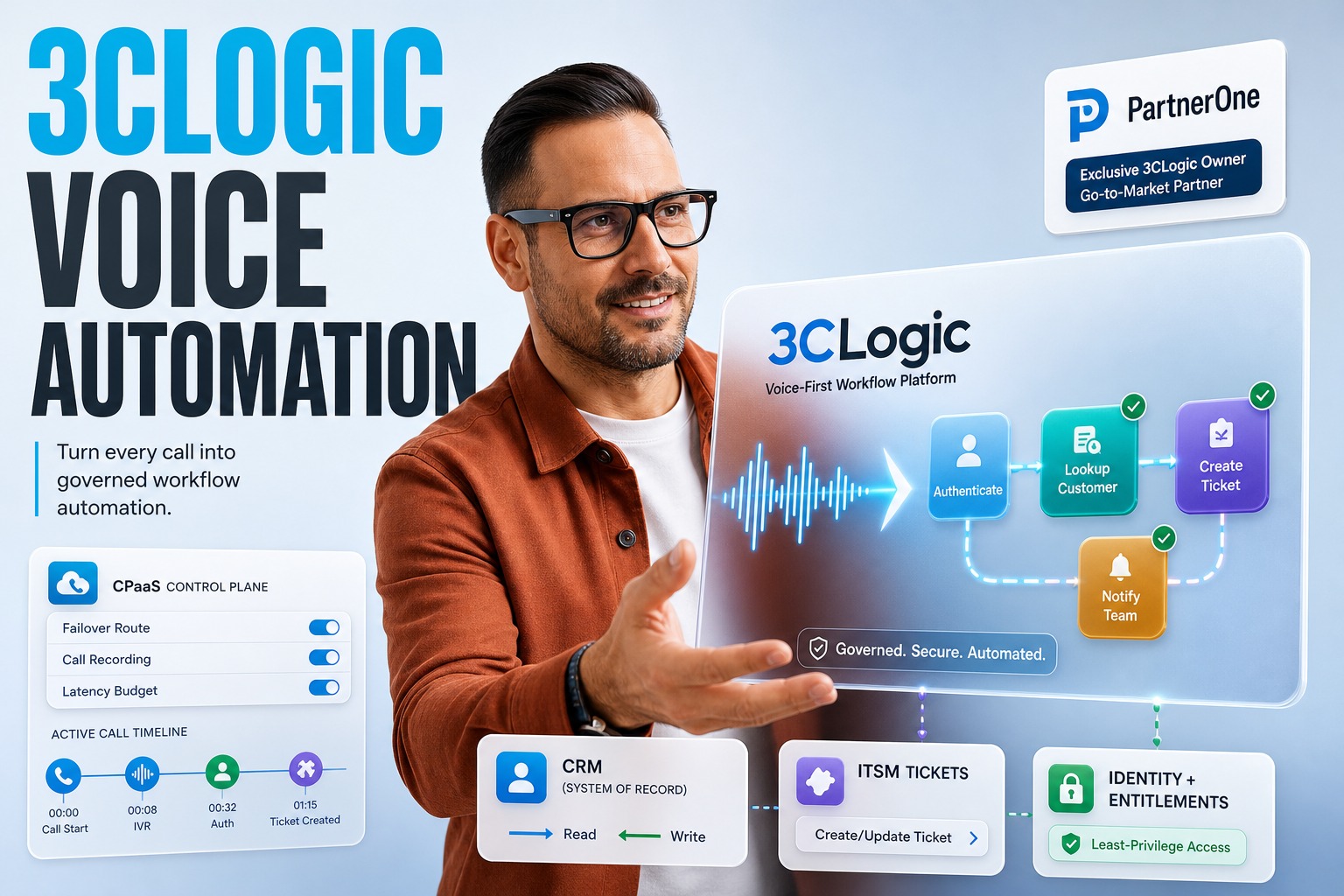
What changed with the 3CLogic acquisition? → PartnerOne adds a voice-first platform that connects conversations to enterprise apps and workflows for business process automation.
Why should engineering leaders care? → Voice is still a primary entry point to support, and it’s finally being wired into execution, not just Q&A.
What’s the technical bet? → CPaaS-grade voice infrastructure plus conversational AI makes personalization operational, not cosmetic.
What’s the risk? → If identity, data access, and workflow boundaries aren’t explicit, ‘smart routing’ becomes ‘smart confusion.’
What’s the opportunity? → Keep your CRM/ITSM, but turn every call into a controlled, measurable automation path.
Quick Answer For CTOs
3CLogic’s move is a pragmatic push toward business process automation through voice: keep your CRM/ITSM as the system of record, but let calls trigger authenticated, data-backed workflows. The acquisition by PartnerOne mainly matters because long-term owners fund the boring parts—reliability, integrations, and rollout discipline. If you want personalization at scale, treat voice as an input channel to operational actions, not a separate ‘AI assistant’ island.
If you’re building this in-house, review enterprise patterns for voice assistant development so call flows, identity, and action execution stay governed.
- Voice automation wins when it can read and write to enterprise workflows, not just respond conversationally.
- Personalization requires governed access to customer context, entitlements, and last-touch history.
- Routing quality improves when models can use operational signals, not only IVR choices.
- The fastest ROI comes from automating routine requests while arming humans for edge cases.
Which Business Process Automation Use Cases Unlock Personalized Voice CX?
3CLogic positions voice as a front door into enterprise execution: conversational AI and voice agents handle routine intents, while intelligent routing and live agents cover the complex paths. The key detail is architectural: the platform is built to complement CRM and IT service management systems rather than replace them. That bias enables personalization, because the ‘truth’ stays in the platforms you already govern.
From an engineering lens, the most valuable business process automation use cases are the ones where the call shouldn’t end with an answer—it should end with a completed task. That is the real shift from experimentation to hyperautomation: conversations become triggers for workflow steps with auditability, data lineage, and controlled side effects. This is where platforms that blend CPaaS with enterprise integrations become strategically different.
Deflect repetitive service requests by executing the same ITSM/CRM actions an agent would run.
Personalize routing using customer status, open tickets, and recent interactions—not only keypad selections.
Pre-fill human-agent context so the first minute of every call is not data gathering.
Close the loop by writing outcomes back to enterprise records for measurement and follow-up.
Why ‘Voice-First’ Works Only When It’s Workflow-First
A voice agent that can’t touch enterprise state is a demo. 3CLogic’s emphasis on connecting voice interactions directly with applications, data, and operational workflows is what turns voice into a production channel. If personalization is your objective, it’s not enough to ‘sound natural’; the system must know what it is allowed to know, and what it is allowed to do.
- Map intents to explicit workflow contracts: inputs required, systems touched, outputs written back.
- Treat every caller as an identity and entitlement problem, not just a transcription problem.
- Design ‘human-in-the-loop’ as a tiered escalation, not a last-resort handoff.
- Instrument outcomes: completion rate, transfer reasons, and downstream rework created.
Personalization Starts With Data Placement, Not Model Choice
Personalization decisions depend on where context lives and how fast it can be retrieved during a call. 3CLogic’s posture—complement CRM/ITSM—keeps the authority of records centralized while allowing the voice layer to query and act. The CPaaS angle matters because latency, call control, and routing logic are not afterthoughts in enterprise support.
| Personalization Input | Where It Usually Lives | What The Voice Layer Should Do |
|---|---|---|
| Customer profile + entitlements | CRM | Retrieve minimal fields, cache briefly, enforce least-privilege access |
| Active incidents / service requests | ITSM | Check status, create/update ticket, summarize next steps |
| Recent interaction history | CRM/contact center logs | Use as routing features and to pre-brief agents |
Business Process Automation Becomes Safer When CRM/ITSM Stay In Charge
The hidden reason ‘don’t replace the system of record’ matters is governance. When the voice layer is additive, you can keep your existing access model, audit trails, and data retention policies. That reduces the blast radius of generative AI features like automated agent assistance, coaching, and sentiment analysis, because they can be constrained to advisory outputs unless a workflow explicitly permits execution.
From a platform perspective, think of this as ai process automation rather than ‘AI chat.’ The voice agent can summarize, route, and recommend, but the commit points—ticket creation, case updates, workflow transitions—can remain in CRM/ITSM APIs you already secure. If you need design help tying intents to enterprise workflows without breaking governance, a focused engagement with AI consulting can clarify contracts, permissions, and observability before you scale.
Define action boundaries: what the agent can read, what it can write, and under which caller authentication.
Keep authoritative state transitions inside CRM/ITSM workflow engines, not in prompt logic.
Use structured logs for every step: intent, retrieved records, routing decision, and outcome.
Roll out by intent family, measuring containment and customer effort before adding new actions.
CPaaS As The Control Plane For Voice Reliability
3CLogic’s inclusion of Communications Platform as a Service capabilities is not a ‘nice-to-have’; it’s the control plane that keeps personalization stable under real call volumes. You need deterministic call handling, fallback routes, and policy-driven routing updates—especially when AI components degrade or a downstream system is slow. Enterprise voice is unforgiving: a dropped call is a failed workflow, no matter how good the model is.
- Prefer deterministic routing fallbacks over ‘best guess’ LLM behavior when dependencies time out.
- Separate media/control from AI inference so one scaling problem doesn’t cascade into outages.
- Treat contact flows as versioned artifacts with rollbacks, testing, and change approvals.
- Instrument latency budgets: identity, context fetch, agent assist, and workflow execution.
RPA Vs AI Agents: Where Voice Fits In The Stack
Many teams get stuck debating rpa vs ai agents as if it’s either/or. In practice, voice is the orchestration layer: it captures intent, negotiates ambiguity, and decides which execution mechanism to call. For deterministic back-office steps, RPA-style automations can still be useful; for variable dialog and exceptions, agentic logic is better. The architecture wins when both are invoked through the same governed workflow boundary.
What PartnerOne’s Long-Term Model Signals For Platform Roadmaps
PartnerOne’s stated long-term ownership approach suggests patience for deep integration work: supporting existing customers and partners, investing in innovation, and expanding AI-powered engagement. For engineering leaders, that typically translates into more predictable roadmap investment in operational features—connectors, admin tooling, monitoring, and security hardening—rather than only flashy demo capabilities.
| What You Need | Why It Matters For Personalization | What To Ask Vendors |
|---|---|---|
| Integration depth | Context must be real-time and authoritative | Which CRM/ITSM actions are first-class, not custom glue? |
| Operational observability | Personalized paths must be measurable | Do you get per-intent outcomes and routing explainability? |
| Safe AI features | GenAI must not bypass governance | How are permissions enforced across retrieval and actions? |
AI Automation Use Cases That Benefit From Voice Context
Voice remains a major channel for customer service and employee support, precisely because it surfaces urgency and ambiguity better than forms. The trick is to convert that messy input into structured work. The platform’s combination of conversational AI, intelligent routing, live interactions, and agent assistance is aimed at that conversion. When done well, the caller experiences personalization as ‘they already know my situation,’ not ‘the bot asked five questions.’
A practical way to design ai automation use cases is to start from ‘work avoided,’ not ‘minutes saved.’ Pick intents where a successful call should reliably produce a system update: ticket created, case status changed, appointment scheduled, or escalation routed to the right skill group with context attached. For teams building this internally, pairing workflow design with ai automation services can accelerate the hard parts: intent-to-API mapping, safe action execution, and the testing harnesses that keep voice releases from becoming production incidents.
Personalization at scale is not an AI feature—it’s a governed workflow capability that happens to start with speech.
How Generative AI Changes Agent Assistance Without Breaking Trust
Generative AI inside contact flows is most valuable when it compresses complexity for humans: summarize the caller’s history, suggest next best actions, and surface knowledge snippets in real time. 3CLogic also calls out coaching and customer sentiment analysis, which can help standardize service quality if you treat them as decision support, not automated judgment.
The Personalization Flywheel: Routing, Assistance, And Feedback
Personalized routing is more than matching language to a queue. It’s a multi-signal decision: who the caller is, what’s already in motion, what outcomes are likely, and which human team can close it fastest. That’s where sentiment, prior outcomes, and operational context become routing features. Over time, this starts to look like recommendation systems, except the ‘recommendation’ is a work path—self-serve workflow, specialist team, or escalation.
The engineering caution: keep the flywheel honest. If you optimize only for containment, you’ll route callers into dead ends and inflate repeat contacts. If you optimize only for speed, you’ll over-escalate and lose automation leverage. The balanced approach is to define success per intent and treat the model’s job as choosing the best next step, with hard constraints from governance and capacity. The strongest personalization is the one that quietly ends work, not conversations.
Building For Humans: Coaching That Actually Scales
Coaching features often fail because they’re bolted on after the fact. If you want coaching and automated agent assistance to improve outcomes, they must attach to the same workflow primitives as routing: intent, customer context, and resolution codes. Then coaching becomes measurable: which guidance reduced handle time, which prompts increased first-contact resolution, and which recommendations correlated with fewer reopenings.
Where Cost Reduction Comes From (And Where It Doesn’t)
The news mentions reducing operating costs and improving service efficiency. In practice, savings don’t come from ‘replacing agents’ so much as from avoiding rework: fewer transfers, fewer repeat calls, fewer manual ticket updates, and better triage. Voice agents that can execute routine requests free humans to handle exceptions—exactly where personalization still needs a person.
A useful mental model is to invest in automated software training for the system itself: scripted regression suites for contact flows, synthetic calls for load tests, and continuous evaluation of summarization and routing. That training discipline is what lets you expand capabilities without turning personalization into inconsistency. It’s also where engineering teams often under-budget time: test harnesses, staged rollouts, and post-release monitoring are the real price of stable automation.
If you can’t test and observe voice workflows like software, you can’t scale personalization responsibly.
A Practical Checklist Before You Scale Business Process Automation Via Voice
Start with architecture, not prompts. Decide where identity is verified, where context is retrieved, and where actions are committed. Make sure failure modes are designed: when the CRM is slow, when ITSM is down, when inference is degraded, when a caller refuses verification. Personalization that breaks under stress becomes distrust.
Finally, treat capacity as a first-class input. Voice systems that escalate intelligently must account for scheduling and resource allocation across skill groups; otherwise ‘smart routing’ floods your best team. The payoff is real, but it requires operational alignment: intent definitions, queue ownership, workflow ownership, and an escalation model that’s agreed by engineering and support ops. Done right, business process automation becomes a customer experience differentiator—not a cost-cutting stunt.
Author: Plavno team. Last updated: November 2026.
 Chat GPT
 Perplexity
 Claude
 Gemini

