The era of "Press 1 for sales, Press 2 for support" is ending. Across the United States, enterprise call centers are replacing outdated Interactive Voice Response (IVR) systems with AI voice assistants that understand natural language, resolve issues autonomously, and deliver seamless customer experiences. This technological shift represents one of the most significant transformations in customer service infrastructure in decades, driven by advances in conversational AI, large language models (LLMs), and real-time voice processing. For businesses managing high call volumes—from healthcare providers to financial institutions—AI voice assistants offer not just improved customer satisfaction, but measurable reductions in operational cost, faster resolution times, and scalable support capabilities that legacy IVR systems simply cannot match.
Introduction
The release of Anthropic’s “Claude Cowork” and the broader industry pivot toward generalist agents mark a definitive shift in how we view enterprise automation. We are no longer building chatbots that answer questions; we are building digital workers that execute tasks. This transition from “information retrieval” to “task completion” is the defining technical challenge of 2026. The signal is clear: major players are betting that an AI can operate as a peer, handling complex workflows like coding, data analysis, and operational logistics without constant human hand‑holding. However, as recent incidents involving autonomous agents deleting critical data have shown, the leap from a helpful assistant to an autonomous coworker introduces catastrophic failure modes that most current architectures are ill‑equipped to handle. If you give an AI the keys to your production environment without a deterministic safety layer, you are not innovating; you are inviting data loss.
Plavno’s Take: What Most Teams Miss
At Plavno, we see a critical disconnect between the hype of “agentic capabilities” and the reality of enterprise infrastructure. Most teams mistake the ability of an LLM to write Python code for the ability to safely execute that code in a production environment. The core mistake is treating the AI agent as a “super‑user” with broad API access, rather than a distinct, untrusted actor that requires its own permission boundary and governance layer.
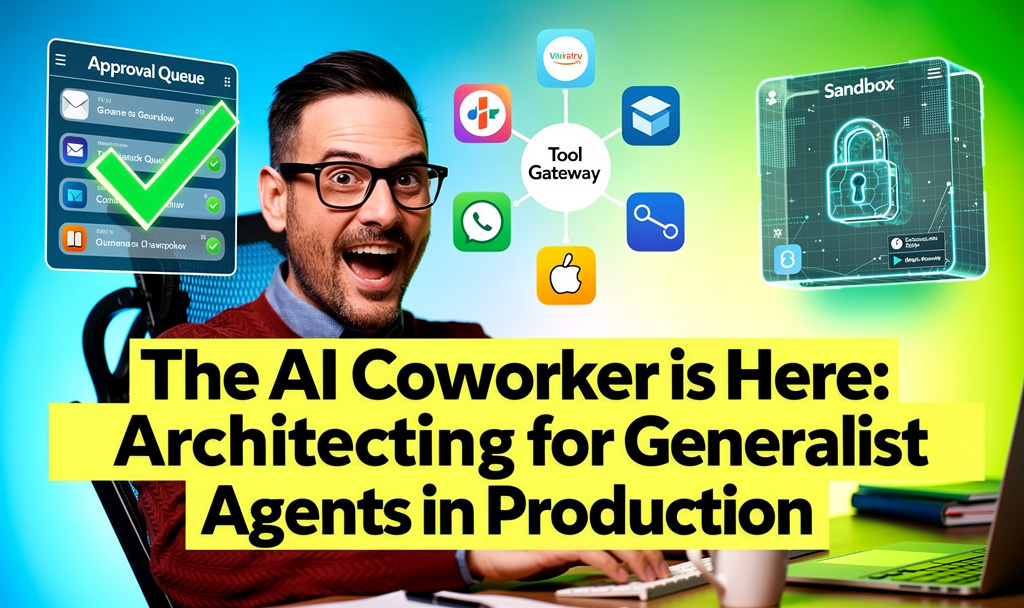
The failure isn’t usually the model’s intelligence; it’s the lack of a “Tool Gateway.” When an agent decides to run a DELETE command or push a change to a master branch, it often does so through a direct API integration that lacks the context checks a human engineer would instinctively perform. We see teams getting stuck on latency and cost, but the real blocker is control. Without a middleware layer that enforces idempotency, rate limits, and human‑in‑the‑loop approvals for destructive actions, deploying a generalist agent is a security risk. The “coworker” needs a manager, and that manager must be a software system, not just a policy document.
What This Means in Real Systems
Architecturally, a true AI coworker requires a fundamental departure from the standard RAG (Retrieval‑Augmented Generation) stack. You cannot simply bolt an agent onto your existing REST APIs and hope for the best. The architecture must support a continuous Agent Loop: Perception (reading state), Reasoning (planning the action), and Action (executing the tool), followed by Observation (verifying the result).
In a production system, this implies a few non‑negotiable components:
- The Tool Gateway / Orchestration Layer: This is the most critical addition. The agent never touches your internal systems directly. It calls a tool (e.g.,
update_crm_record), which is actually a hardened API endpoint managed by an orchestration framework like LangChain or a custom Kubernetes‑based service. This gateway validates the schema, checks the user’s permissions mapped to the agent, and logs the intent before execution. - State Management and Memory: A coworker needs context. Short‑term conversation memory is insufficient. You need a hybrid memory architecture combining Vector databases (for semantic retrieval of past projects) with structured SQL/NoSQL stores (for factual state, like “ticket #123 is open”). If the agent cannot recall the constraints of the previous sprint, it cannot function as a team member.
- Observability and Tracing: Standard logging isn’t enough. You need to trace the “Chain of Thought.” When an agent makes a decision, you must be able to replay the reasoning step‑by‑step. Tools like LangSmith or Arize are essential here to debug why an agent decided to call a specific API.
- Sandboxed Execution Environments: For coding agents, this means containerized runtimes (Docker/Firecracker microVMs). The agent writes code, the system compiles it in an isolated sandbox, runs tests, and only then is the output considered for deployment. Never let an LLM write directly to a shared filesystem.
Why the Market Is Moving This Way
The shift is driven by the maturation of Tool Use and Function Calling in frontier models. Six months ago, an agent could only talk about doing something. Today, models like Claude 3.5 Sonnet and GPT‑4o can reliably structure JSON arguments to call complex functions. This technical capability unlocks the “Coworker” metaphor.
Furthermore, the economics of software development are forcing the issue. Engineering talent is expensive and scarce. Businesses are realizing that while an LLM cannot replace a Senior Architect, it can absolutely handle the 80% of grunt work—writing unit tests, updating documentation, refactoring legacy code, and triaging Level 1 support tickets. The market is moving toward operational efficiency. The technology has finally reached a threshold where the reliability of tool execution is high enough to risk automation in high‑value workflows, provided the guardrails are in place.
Business Value
The business case for the AI Coworker is not about “cool tech”; it is about reclaiming engineering cycles. Consider a typical software maintenance sprint. In many organizations, 30–40% of engineering time is spent on low‑complexity, high‑volume tasks: dependency updates, log analysis, and minor bug fixes.
By deploying a coding agent with a sandboxed GitHub integration, we typically see a 40–50% reduction in time‑to‑resolution for these routine tasks. In one scenario, a client’s QA team was overwhelmed with regression testing. By implementing an agent that automatically generated test cases based on JIRA tickets and executed them in a parallel CI/CD pipeline, they increased their test coverage by 3× without hiring a single new QA engineer.
Financially, the math is compelling. A fully managed AI agent operating at a scale of 1,000 tasks per month might cost $2,000–$5,000 in infrastructure and token usage. Compare this to the fully loaded cost of a mid‑level engineer ($10,000–$15,000/month). Even if the agent only handles 30% of that engineer’s workload, the ROI is immediate. The value shifts from “cost of code” to “speed of delivery.”
Real‑World Application
1. Automated DevOps Remediation:
A SaaS company implemented an agent connected to their monitoring stack (Datadog) and Kubernetes API. When a specific alert fired (e.g., “High Memory Usage on Pod X”), the agent didn’t just notify the on‑call engineer. It analyzed the logs, determined the issue was a memory leak in a specific container, and executed a pre‑approved rolling restart script. The result: Mean Time To Recovery (MTTR) for this specific failure mode dropped from 15 minutes to 45 seconds.
2. The Internal Data Analyst:
A logistics firm built an agent with access to a read‑only replica of their data warehouse. Instead of waiting for the data team to write SQL queries, business analysts could ask the agent, “What was the average dwell time for trucks in the Ohio depot last Tuesday?” The agent generated the SQL, executed it, and returned a chart. This freed up the data team to focus on predictive modeling rather than ad‑hoc reporting.
3. Legacy Code Migration:
A financial institution needed to migrate a monolithic Java application to a microservices architecture. They utilized an agent trained on their specific coding standards to parse the legacy codebase, identify dependencies, and generate the boilerplate code for the new Go services. Senior engineers then reviewed and refined the output. This accelerated the discovery phase of the migration by an estimated 60%.
How We Approach This at Plavno
We do not believe in “black box” agents. At Plavno, every agent we build is grounded in a Human‑in‑the‑Loop (HITL) philosophy. We design systems where the agent proposes, and the human disposes, especially for high‑stakes actions.
Our standard architecture involves an Approval Queue. When an agent decides to perform a destructive action (like deleting a database entry or sending a mass email), it does not execute immediately. It pushes a payload to a queue (e.g., RabbitMQ or AWS SQS). A dashboard alerts the human supervisor, who reviews the proposed action and the agent’s reasoning. One click approves the execution; one click rejects it. This combines the speed of AI with the accountability of human oversight.
Furthermore, we prioritize custom software development over off‑the‑shelf wrappers. We build bespoke tooling layers that integrate deeply with the client’s existing ERP, CRM, or codebase. We ensure that the agent is not just a generic chat interface, but a specialized component of the software stack, complete with its own CI/CD pipeline for prompt management and model updates.
What to Do If You’re Evaluating This Now
- Identify a High‑Volume, Low‑Risk Workflow: Look for repetitive tasks where the cost of error is low but the frequency is high (e.g., summarizing meetings, tagging tickets, formatting data).
- Audit Your API Surface: Do not give the agent access to your entire API. Create a dedicated, scoped API key with only the permissions necessary for that specific workflow. Treat the agent like a junior developer with restricted access.
- Invest in Evaluation Data: Before launch, build a “golden dataset” of test cases. How should the agent respond to edge cases? If you cannot measure its accuracy, you cannot deploy it safely.
- Don’t Ignore the UI: The agent needs an interface. Whether it’s a Slack bot or a dashboard extension, the user experience determines adoption. If it’s hard to correct the agent’s mistakes, users will abandon it.
- AI consulting experts can save months of architectural drift if you lack internal expertise.
Conclusion
The era of the AI Coworker is not a distant future; it is a present reality that demands a new architectural discipline. The technology is powerful enough to execute complex tasks, but it is the responsibility of the system architects to ensure it executes them safely. The winners in this space will not be those with the best model, but those with the most robust, secure, and observable infrastructure surrounding that model. If you are ready to move beyond prototypes and build AI that actually works in your business, you need to start treating the agent like a piece of critical infrastructure—because it soon will be.

